Storydoc vs. Canva

Canva is great for making simple things pretty. But when it comes to professional business documents that drive real results (like more leads, more demos, and more deals - "pretty" isn’t enough.

You need a Canva alternative built for performance, not just basic aesthetics. An app similar to Canva that doubles your conversion and growth. You need…
Storydoc.

Storydoc vs Canva

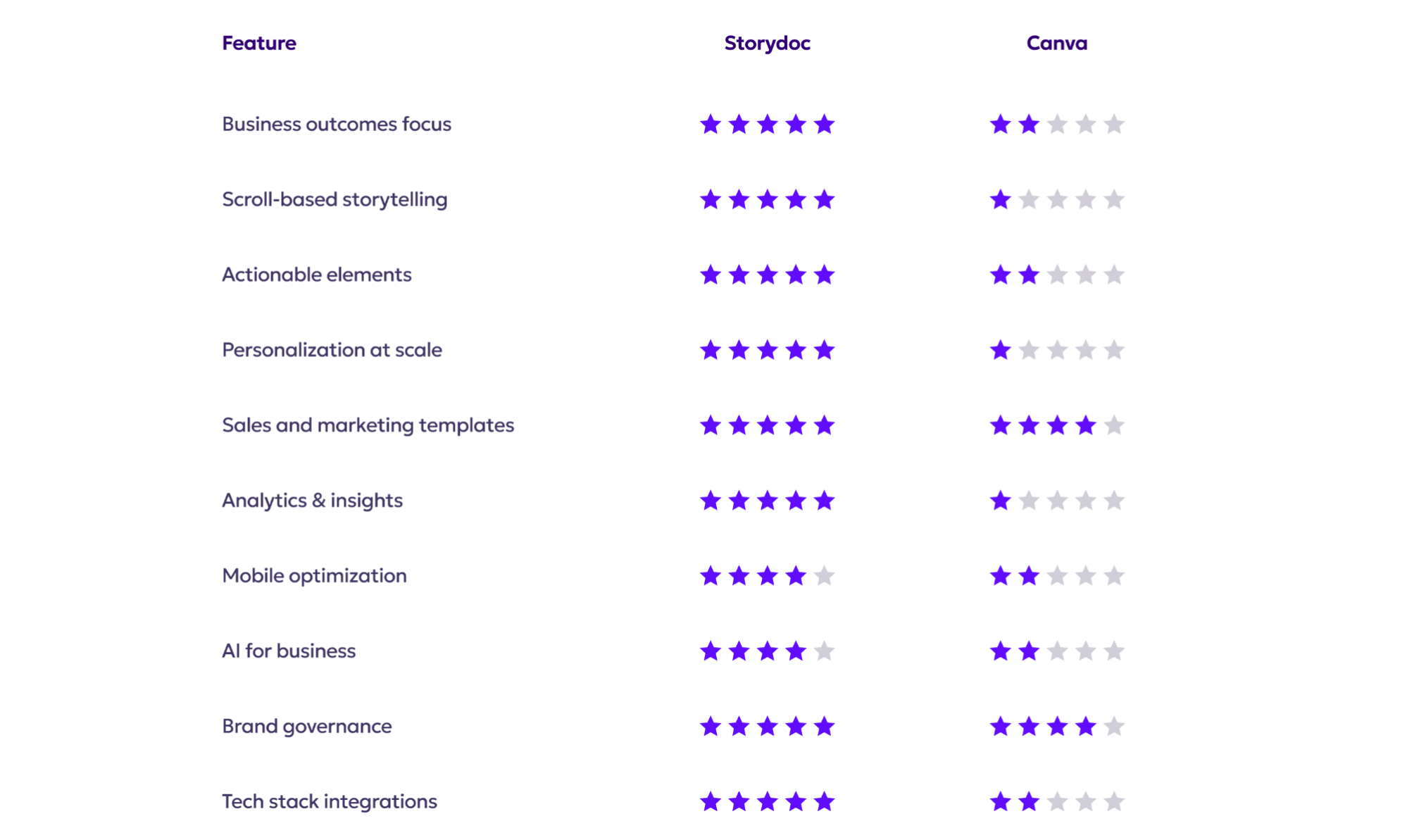
Quick comparison guide

Storydoc vs Canva
Storydoc vs Canva

Built for business outcomes

Storydoc vs Canva

Storydoc is designed to drive conversions, leads, and sales with conversion-focused layouts and embeddable CTAs.

Templates are structured around buyer journeys and proven to improve conversion metrics.

Designed with B2B workflows in mind - from lead generation to signed contracts.

Storydoc vs Canva

Canva is focused on visual creativity, not business outcomes.

No guidance or features tailored for sales and marketing funnels.

Great for graphics, not for growth.

Storydoc vs Canva
Storydoc vs Canva
Storydoc vs Canva

Scroll-based storytelling

Storydoc vs Canva

Vertical storytelling that mimics web experiences, not old-school slides.

A seamless flow that increases reading time by 41% and engagement by 21%.

Designed for async communication to sell by itself.

Storydoc vs Canva

Click-through slides break the narrative and reduce user engagement.

Not optimized for independent consumption.

Format built for design projects, not interactive storytelling.

Storydoc vs Canva
Storydoc vs Canva
Storydoc vs Canva

Actionable vs. passive

Storydoc vs Canva

Native CTAs, calendars, and forms to push users to the next step.

Built-in tools to book meetings, collect info, or sign deals directly in the doc.

Proven to reduce drop-offs and increase closing times by 30%.

Storydoc vs Canva

Canva decks end in dead ends - no built-in CTAs or embedded actions.

Requires additional tools to move leads forward.

Looks good but fails to convert.

Storydoc vs Canva
Storydoc vs Canva
Storydoc vs Canva

Personalization at scale

Storydoc vs Canva

Personalized decks in seconds using CRM data and custom variables.

Bulk-send capabilities without editing each deck manually.

Used by sales teams to scale 1-to-1 outreach at 1-to-many speed.

Storydoc vs Canva

Manual personalization is slow and prone to error.

No smart variables or CRM integration.

Not scalable for large outreach efforts.

Storydoc vs Canva
Storydoc vs Canva
Storydoc vs Canva

Tailored for sales & marketing

Storydoc vs Canva

Templates optimized for pitch decks, product demos, proposals, or any other business document.

Content layouts built around key B2B storytelling formats.

Strategic messaging baked in to highlight value and ROI.

Storydoc vs Canva

Canva’s flexibility leaves you without guidance.

Requires you to create your structure from scratch.

Better for designers than sellers looking to drive conversion.

Storydoc vs Canva
Storydoc vs Canva
Storydoc vs Canva

Performance tracking & insights

Storydoc vs Canva

Full funnel visibility. See who viewed your deck, what they clicked, and where they dropped off.

Heatmaps and smart analytics to optimize follow ups and increase engagement.

Helps you understand what’s working (and what’s not).

Storydoc vs Canva

No analytics or viewer data - once you send, it’s a black hole.

No way to iterate based on real performance.

Lacks visibility into engagement, leaving you to guess the right next steps.

Storydoc vs Canva
Storydoc vs Canva
Storydoc vs Canva

Designed for mobile

Storydoc vs Canva

Fully mobile-responsive, scroll-friendly layouts.

Automatically adapts to any screen size, like a web page.

Nails the experience for the 47% of outreach decks opened on mobile.

Storydoc vs Canva

The slide-by-slide format is hard to navigate on small screens.

Requires zooming and manual resizing. A total nightmare for busy clients.

Built for print and social media, not mobile-first business deals.

Storydoc vs Canva
Storydoc vs Canva
Storydoc vs Canva

AI capabilities

Storydoc vs Canva

AI that writes, structures, and suggests content to support conversion.

Generates impactful slides, images, and messaging instantly.

Modify the AI’s knowledge and create hyper-personalized decks.

Storydoc vs Canva

Canva’s AI is more about design than conversion.

Helps with layout but not business storytelling.

No way to modify the AI’s knowledge and content source.

Storydoc vs Canva
Storydoc vs Canva
Storydoc vs Canva

Brand guardrails & governance

Storydoc vs Canva

Lockable styles, layouts, and branding to ensure brand consistency.

Control what your team can and can’t change with smart permissions.

Perfect for larger teams and cross-functional usage.

Storydoc vs Canva

Canva lets you save brand colors, fonts, and logos for consistent reuse across designs.

The free plan doesn’t include a Brand Kit: Canva Pro, Teams, or Enterprise is required.

Advanced brand controls (locked assets, approvals) are limited to Teams and Enterprise plans.

Storydoc vs Canva
Storydoc vs Canva
Storydoc vs Canva

Integrated business ecosystem

Storydoc vs Canva

Works with HubSpot, Salesforce, Gong, and more.

Supports API and CRM sync for automated workflows and bulk creation.

Plays well with your sales stack, not just your design tools.

Storydoc vs Canva

Canva integrations are focused on design tools like printers and asset libraries.

No deep CRM or analytics integrations.

Limited bulk creation of decks at scale.

Storydoc vs Canva
Storydoc vs Canva

So, what’s it going to be?

Do you want to create beautiful visuals - or documents that move business forward?

Canva is great for design.
Storydoc is like Canva, but made for teams that need content to convert.


It’s time to go beyond aesthetics and start driving outcomes.

Storydoc vs Canva