Storydoc vs. Chronicle

Chronicle makes it easy to turn ideas into decks.

But when it comes to creating business documents that engage prospects, scale with your CRM, and actually help you close deals - a general-purpose presentation tool isn’t enough.

You need a Chronicle alternative built to drive deals forward, not just assemble slides.

You need...
Storydoc.

Storydoc vs. Chronicle

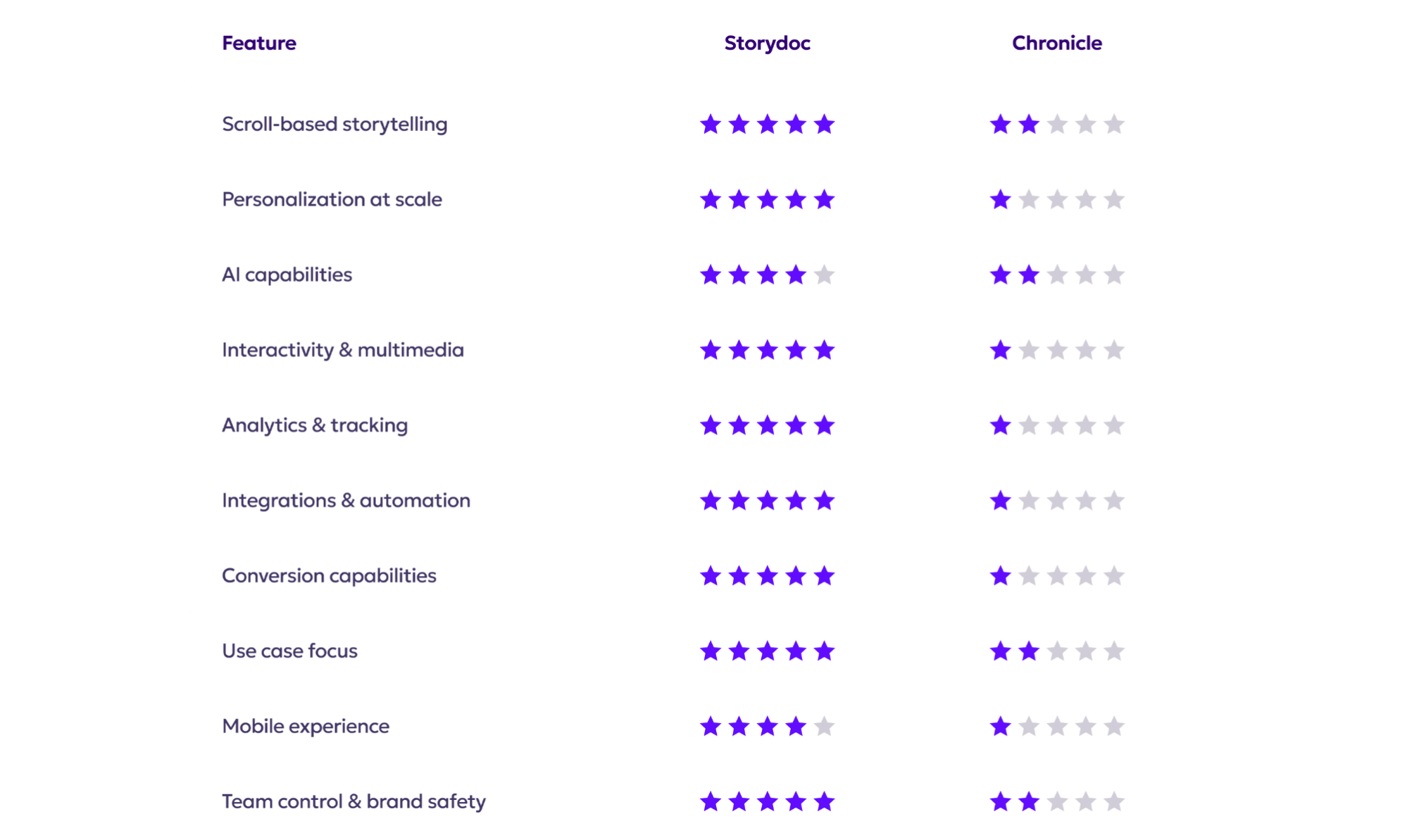
Quick comparison guide

Storydoc vs. Chronicle

Scroll-based storytelling

Storydoc vs. Chronicle

A continuous, scroll-based format that feels like a modern web page rather than a traditional slide deck

Designed to guide readers through a clear narrative, from opening context to call to action

Supports self-guided exploration while still nudging prospects forward through the story

Storydoc vs. Chronicle

Uses a scroll-based canvas, but without features that actively guide the reader through the story

No narrator elements, progressive reveal, tabs, or expandable sections to structure the narrative

Feels more like a long static page where content sits next to each other rather than a guided experience

Storydoc vs. Chronicle

Personalization at scale

Storydoc vs. Chronicle

Built to personalize documents automatically using CRM data, variables, and dynamic content

Allows teams to generate hundreds of tailored decks from a single template without manual edits and send them in bulk with no recipient limits

Decks can be created straight from CRM records, keeping personalization and delivery tightly connected

Storydoc vs. Chronicle

Offers brand-level customization like themes, colors, and fonts, but no content personalization

No CRM integrations or dynamic variables to tailor decks per prospect or account

Personalization is manual, making it slow, error-prone, and hard to scale across teams

Storydoc vs. Chronicle

AI capabilities

Storydoc vs. Chronicle

Uses AI to generate full decks from prompts, documents, or existing content, with structure and flow tailored to business use cases

You can build a reusable content base called StoryBrain that can be applied across multiple presentations

It’s designed to reduce manual clean-up, producing decks that are closer to buyer or investor-ready from the start

Storydoc vs. Chronicle

Lets you start from a prompt, link, template, or uploaded document, but results are very basic, without advanced data visualization or interactivity

Generates AI output separately for each deck, with no shared content base across presentations

AI-generated visuals often don’t match the content, and outputs require significant manual edits before they’re suitable for sales or investor conversations

Storydoc vs. Chronicle

Interactivity & multimedia embeds

Storydoc vs. Chronicle

Offers built-in interactive elements like tabs, expandable sections, charts, videos, forms, pricing slides, and more

Designed to structure complex content without overwhelming the reader, using interaction to guide attention

Supports interactive components that help move readers toward the next step, not just consume content

Storydoc vs. Chronicle

Supports basic multimedia embeds, but most elements behave like static content blocks

No tabs, expandable sections, or progressive reveal to help organize or pace information

Interactivity is limited to what can be embedded externally, with no native tools to guide reader behavior

Storydoc vs. Chronicle

Performance analytics & insights

Storydoc vs. Chronicle

Provides detailed analytics showing who viewed the deck, how long they spent on each slide, what they interacted with, and where they dropped off

Sends real-time alerts when prospects open the deck, helping teams follow up at the right moment

Engagement data can flow back into the CRM, keeping sales activity and insights in one place

Storydoc vs. Chronicle

Does not offer built-in analytics on reader behavior or engagement

No visibility into views, time spent, or interactions, leaving teams to share links without feedback

For sales use cases, this means operating without insight into interest or intent

Storydoc vs. Chronicle

Tech stack integrations

Storydoc vs. Chronicle

Offers native integrations with tools like HubSpot, Salesforce, Gong, and other sales and marketing platforms

Can connect to thousands of apps through Zapier, enabling automated workflows across teams

Makes it possible to automatically generate hundreds of decks from CRM records or spreadsheets, without manual setup

Storydoc vs. Chronicle

Integrations are limited and mainly focused on content creation or visual elements

No CRM integrations or API for automating business workflows

Any automation relies on manual work or external embeds, making it hard to scale

Storydoc vs. Chronicle

Conversion capabilities

Storydoc vs. Chronicle

Includes built-in calls to action like meeting scheduling, forms, e-signatures, and payments

Allows prospects to take action directly inside the document instead of clicking away

Designed to shorten deal cycles by up to 30% by removing friction between interest and action

Storydoc vs. Chronicle

Does not offer native conversion or call-to-action components

Any links or actions send readers outside the deck or rely on embedded iframes

No support for e-signatures, payments, or deal-closing steps within the document

Storydoc vs. Chronicle

Use case focus

Storydoc vs. Chronicle

Built specifically for sales, marketing, and customer-facing business documents

Optimized for proposals, pitch decks, product demos, reports, and other revenue-driving assets

Designed for teams that need documents to perform, scale, and support measurable outcomes

Storydoc vs. Chronicle

Geared toward general-purpose presentations and individual storytelling

Works well for personal decks, internal updates, or creative one-off presentations

Less suited for structured sales, marketing, or enterprise use cases that require scale and consistency

Storydoc vs. Chronicle

Mobile performance

Storydoc vs. Chronicle

Built with a mobile-first approach, so documents adapt naturally to smaller screens

Text, layouts, and interactive elements remain readable and usable without pinching or zooming

Designed for busy buyers who often open documents on the go

Storydoc vs. Chronicle

Scroll-based on mobile, but some elements are not properly optimized for smaller screens

Text and visuals can become obstructed, forcing users to pinch and zoom to read

Creates friction for mobile readers, especially in sales or time-sensitive contexts

Storydoc vs. Chronicle

Team control & brand consistency

Storydoc vs. Chronicle

Supports real-time collaboration with clear roles, smart permissions, and controlled access

Lets teams lock templates and brand elements while still enabling fast content creation

Meets enterprise security standards, including ISO 27001, for teams that need trust and compliance

Storydoc vs. Chronicle

Offers basic brand controls like themes, colors, and fonts

You can collaborate with team members, but enterprise features are still in early stages and not fully available

Better suited for individual creators than larger teams with strict brand or governance needs

Storydoc vs. Chronicle

So, what’s it going to be?

Do you want to assemble presentations - or build business documents that actually help you close deals?

Chronicle is good for creating general-purpose presentations.

Storydoc goes further, with personalization, analytics, integrations, and conversion tools for teams that need documents to perform.

It’s time to move beyond static decks and build documents designed for real business impact.

Storydoc vs. Chronicle