Storydoc vs. Google Slides

Google Slides is great for quick, collaborative presentations.

But when it comes to delivering proposals, pitch decks, onboarding materials, or client-facing documents that need to win business, a basic slide deck isn’t enough.

You need a Google Slides alternative built for engagement, personalization, and conversion.

You need...

Storydoc.

Storydoc vs Google Slides

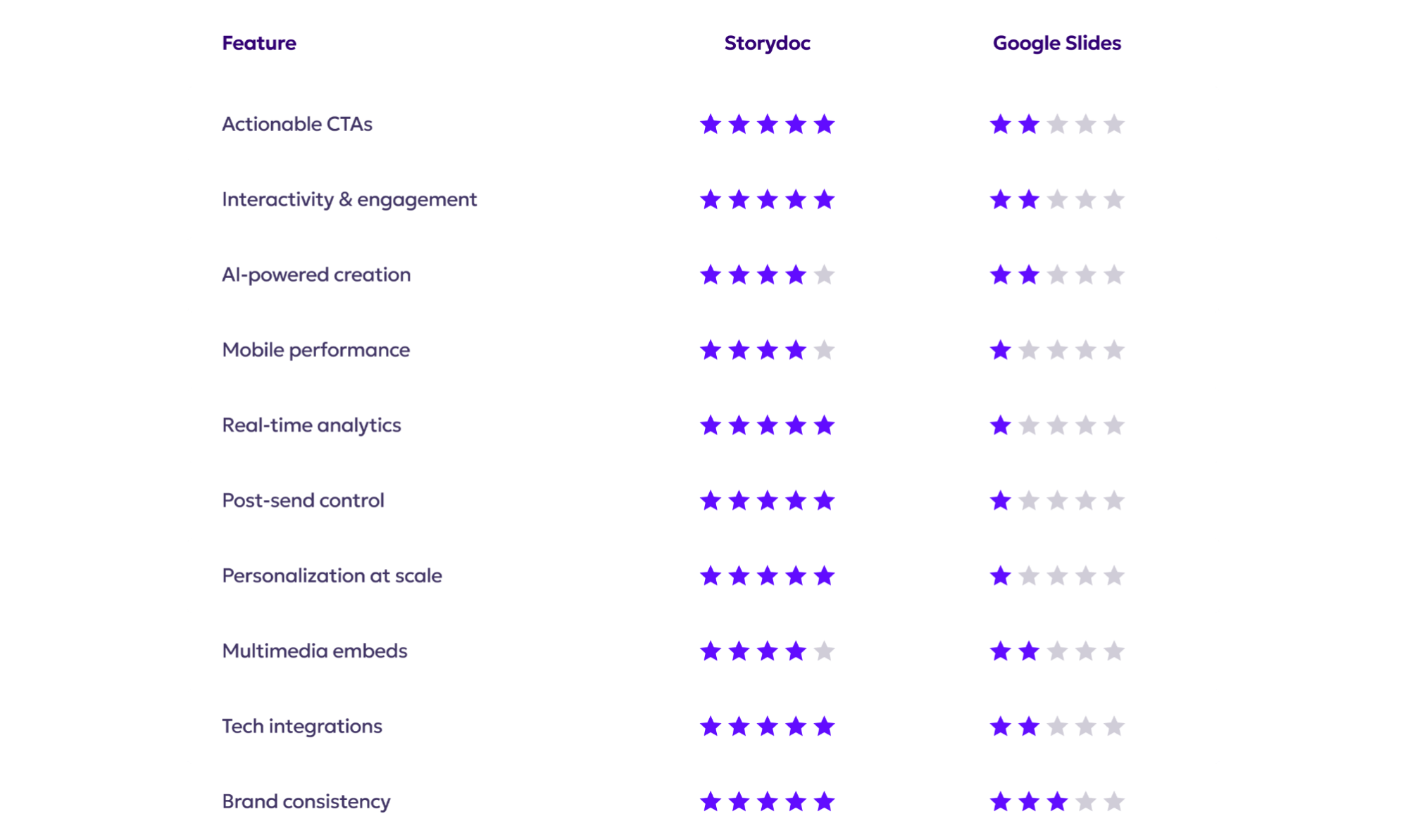
Quick comparison guide

Storydoc vs Google Slides

Actionable vs. passive

Storydoc vs Google Slides

Built from the ground up for async sales and marketing, meaning your deck sells for you even when you’re not there

Guides your audience toward conversion with embedded CTAs (e.g. “Book a demo” buttons and forms)

Drives 2× more demos booked and 30% faster deal cycles by reducing friction in the sales process

Storydoc vs Google Slides

Created for live, in-person presentations, not optimized for asynchronous sharing or self-guided reading

Leaves viewers with no clear next step - there are no built-in call-to-action buttons or forms to capture interest

Stalls your pipeline by adding friction and leaving prospects hanging, resulting in lost opportunities

Storydoc vs Google Slides

Interactivity & engagement

Storydoc vs Google Slides

Keeps readers engaged with interactive elements - clickable tabs, sliders, collapsible sections, and more

Delivers personalized experiences that adapt to how each user interacts (letting them explore the content most relevant to them)

Proven to boost engagement, with 41% more decks read in full and a 21% increase in average reading time

Storydoc vs Google Slides

Static and linear format - forces your audience to click through slides one by one, which often breaks the narrative flow

Presents a one-size-fits-all experience with no interactivity - a missed opportunity to tailor the story to each prospect

Viewers tend to disengage quickly with traditional slides (the classic “death by PowerPoint” effect), leading to low retention rates

Storydoc vs Google Slides

AI-powered creation

Storydoc vs Google Slides

Automatically generates a complete deck for you with AI, giving you an instant starting point optimized for conversion

Offers smart image selection and layout suggestions, so you don’t need design expertise to create a winning deck

Includes built-in AI tools for rewriting, translating, or polishing your copy, helping you tailor content to each audience

Storydoc vs Google Slides

Very basic AI assistance (limited mostly to spell-check or simple layout adjustments) with no conversion-focused features

Provides no intelligent design or visual suggestions

Relies on a time-consuming manual creation process for creating and editing decks, which slows down your ability to respond to opportunities

Storydoc vs Google Slides

Mobile performance

Storydoc vs Google Slides

Fully mobile-responsive design - every Storydoc deck automatically adapts to any screen size

Uses vertical, scroll-friendly layouts (like a web page) so readers never have to pinch, zoom, or squint

With 32% of all decks opened on mobile, it ensures you make a great first impression with mobile-first buyers

Storydoc vs Google Slides

Hard to navigate on small screens - slide layouts are not optimized for mobile, forcing users into a pinch-and-zoom nightmare

Slide content can become distorted: layouts may break or text might shrink to an unreadable size on phones

Risks ruining your first impression with prospects who open the deck on their phone, potentially causing them to give up

Storydoc vs Google Slides

Real-time analytics

Storydoc vs Google Slides

Provides full-funnel visibility - you can see open rates, scroll depth, time spent on each section, button clicks, and more

Delivers actionable insights, so you know exactly who’s engaged and what caught their attention

Offers real-time alerts and notifications, allowing your team to follow up at the perfect moment

Storydoc vs Google Slides

No built-in analytics - once you send a Google Slides deck, you’re essentially in the dark about what happens next

You send and hope for the best, with only basic info like whether the email was opened

Lacks meaningful data for sales optimization, making it hard to improve or personalize follow-ups

Storydoc vs Google Slides

Post-send editing

Storydoc vs Google Slides

Lets you share a live link to your deck and create multiple versions for different audiences, all tied to a master deck

You can edit or update content anytime - even after you’ve sent the link

Eliminates version confusion: prospects always see the most up-to-date version

Storydoc vs Google Slides

Any change requires manual updates to each file version

If you’ve exported or emailed a deck, you must resend a revised file for the prospect to see updates

Creates confusion, as buyers might end up with multiple files and no clarity on the latest content

Storydoc vs Google Slides

Personalization at scale

Storydoc vs Google Slides

You can instantly personalize content at scale by integrating with your CRM data

Lets you bulk send multiple customized decks in one click, with no recipient limits

Connects directly to your CRM, creating decks as part of your workflow

Storydoc vs Google Slides

No built-in bulk personalization - each deck must be duplicated and edited for each prospect by hand

High chance of human error, and each manual edit risks breaking the design

Impossible to scale outreach with truly personalized slides

Storydoc vs Google Slides

Multimedia-first experience

Storydoc vs Google Slides

Lets you embed rich multimedia natively: videos, calendars, lead capture forms, interactive maps, and more

Keeps all your content and calls-to-action in one place so prospects don’t get lost opening multiple links or attachments

Turns passive viewers into active participants - readers can watch, click, and even input information right in the document

Storydoc vs Google Slides

Limited support for embedded content - you can insert YouTube videos, but you can’t integrate things like live forms or calendars

Often results in a multi-window juggling act, adding friction and giving prospects more chances to drop off

Overall a clunky, fragmented experience for the reader - not the seamless journey you need to keep modern buyers engaged

Storydoc vs Google Slides

Tech stack integration

Storydoc vs Google Slides

Connects seamlessly with your existing sales and marketing stack

It works natively with tools like Salesforce, HubSpot, Gong, and more

Offers Zapier integrations with 8,000+ apps and 450+ AI tools, so you can scale your workflows with confidence

Storydoc vs Google Slides

No meaningful integrations with modern B2B tools - Google Slides mostly stands alone, apart from basic connection to Google Drive

Functions in isolation from your CRM and sales enablement systems, creating gaps where data and insights get lost

You can’t easily plug Slides into your customer data pipelines to auto-generate content or feed viewing data back into your CRM

Storydoc vs Google Slides

Modern branding & consistency

Storydoc vs Google Slides

Every deck automatically follows your brand guidelines and designs adjust instantly to stay on-brand

Provides shared team workspaces and smart permission controls, ensuring consistency across the whole team

Easily scalable across large teams or departments without risking off-brand slides

Storydoc vs Google Slides

Design and branding are left entirely up to each user

There are no enforced brand templates or locks, so slides can vary greatly from person to person

No built-in guardrails for brand consistency, so ensuring every slide deck follows your company style requires constant manual oversight

Storydoc vs Google Slides

So, what’s it going to be?

Do you want to build documents that present - or ones that convert?

Google Slides may be fine for basic, internal presentations, but it wasn't built for driving engagement and conversion.

Storydoc is built for modern business: async-ready, interactive, and measurable.

It’s time to leave static slides behind and start winning with Storydoc.

Storydoc vs Google Slides