Storydoc vs. PandaDoc

PandaDoc is a strong player when it comes to quotes and getting signatures fast.

But if you’re looking to impress across the entire buyer journey - with collateral that actually converts leads, not just closes them - you need a platform that goes beyond signing.

You need a PandaDoc alternative built for performance, not just paperwork.

You need…

Storydoc.

Storydoc vs. PandaDoc

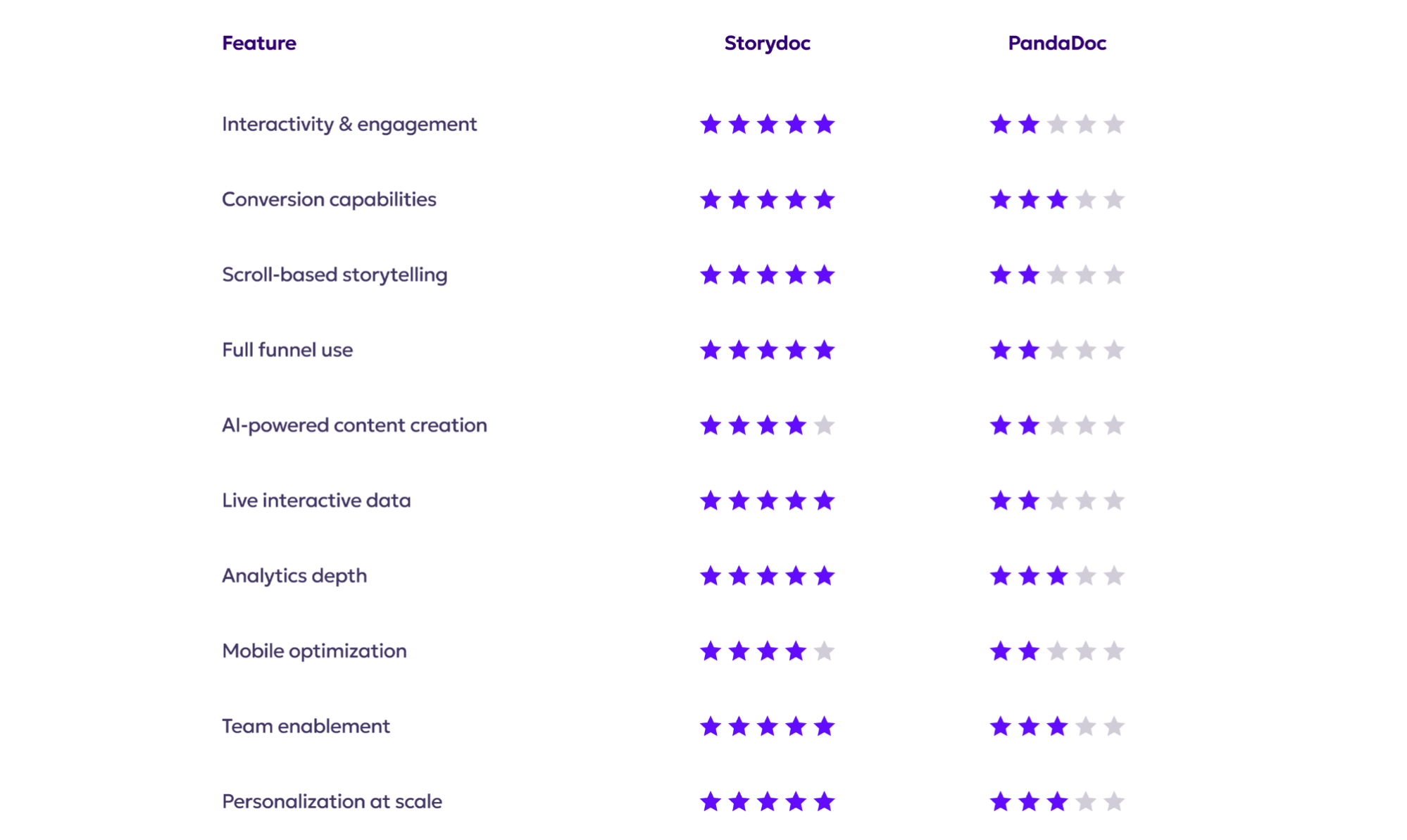
Quick comparison guide

Storydoc vs. PandaDoc

Interactivity & engagement

Storydoc vs. PandaDoc

Built for truly interactive sales experiences (tabs, guided layouts, embedded content) that keep attention moving

Turns reading into participation, so buyers explore rather than scroll past walls of text

Designed for modern buyer behavior, which increases average reading time by 41% and engagement rate by 21%

Storydoc vs. PandaDoc

Interactivity is mostly functional: pricing tables, signing fields, and embedded elements inside a document workflow

The experience still often feels like a PDF dressed up for the web, rather than an interactive narrative

Strong at close-stage mechanics, but limited in engagement patterns that help buyers explore and learn earlier

Storydoc vs. PandaDoc

Conversion capabilities

Storydoc vs. PandaDoc

Built for conversion at every stage: CTAs, calendars, forms, and e-signatures inside the flow

Helps create deals by moving people from interest to action, not just from proposal to signature

Designed for async sales and marketing, where the content does the selling when you’re not in the room

Storydoc vs. PandaDoc

Focused on closing: e-signatures, approvals, and payment/quote flows are core to the product

No built-in scheduling or interactive funnel elements

Doesn’t help with lead nurturing or early-stage engagement.

Storydoc vs. PandaDoc

Scroll-based storytelling

Storydoc vs. PandaDoc

Organizes long sales content into a clear, flowing sequence that’s easy to follow from start to finish

Guides readers through the message step by step, so they always know what to focus on next

Designed for asynchronous selling, where the structure of the content does the storytelling for you

Storydoc vs. PandaDoc

Content is delivered online, but follows a traditional document layout rather than a guided narrative

Pages are largely static, with limited ways to reveal information progressively or steer attention

Works well for reviewing terms and signing, but offers little support for persuasive storytelling

Storydoc vs. PandaDoc

Full stack vs. only proposals

Storydoc vs. PandaDoc

Supports sales content across the entire buyer journey, from early-stage decks and one-pagers to proposals and post-meeting follow-ups

Makes it easy to reuse and adapt the same content blocks at different stages, so the story stays consistent

Built to work as part of your sales and marketing stack, rather than as a standalone document tool

Storydoc vs. PandaDoc

Centered on managing documents at the closing stage, including proposals, contracts, and approvals

Doesn’t cover early engagement or discovery, which means teams rely on other tools before a document is sent

Works well as a closing system, but isn’t designed to support full-funnel sales engagement

Storydoc vs. PandaDoc

AI-powered content creation

Storydoc vs. PandaDoc

StoryBrain lets you feed in existing materials (docs, links, brand assets) and generates structured, on-brand output

You can start from a prompt, then edit individual slides/sections with the built-in assistant without leaving your workflow

AI works with hundreds of pre-built templates and interactive components, producing ready-to-use sales assets in a few minutes

Storydoc vs. PandaDoc

AI Assistant helps with summarizing contract content, pulling insights, organizing files, or generating emails directly inside the platform

The AI experience is task-oriented, not a native document generator that constructs a full proposal from uploaded content and context

Document creation still starts from templates or manual input, which is time-consuming for busy reps

Storydoc vs. PandaDoc

Live interactive data

Storydoc vs. PandaDoc

Allows prospects to engage with numbers directly, rather than viewing static charts or screenshots

Presents complex figures in interactive formats that make them easier to grasp as part of the narrative

Offers a wide range of ready-made data visualization components that are designed to keep data engaging

Storydoc vs. PandaDoc

Pricing tables let buyers configure options (optional items, quantities, discounts, taxes) and instantly see how totals change

Focuses on functional data display rather than making numbers visually engaging

Works well for pricing decisions, but offers limited support for interactive data beyond that context

Storydoc vs. PandaDoc

Engagement analytics depth

Storydoc vs. PandaDoc

Tracks detailed engagement across the entire funnel, including views, scroll depth, time spent per section, clicks, and CTA interactions

Gives teams a real-time dashboard showing how prospects move through content, where they engage, and where they drop off

Feeds engagement data into your CRM and analytics stack, so insights can trigger follow-ups, workflows, and next steps automatically

Storydoc vs. PandaDoc

Real-time dashboards track document activity such as views, time spent, link clicks, and signing status

Page-level insights show which parts of a document were read and for how long

Analytics are designed to help teams refine templates, improve document workflows, and close deals faster - not optimize engagement across the full funnel

Storydoc vs. PandaDoc

Mobile reading experience

Storydoc vs. PandaDoc

Fully responsive decks keep the experience clean and readable on any device

Mobile-friendly structure reduces scrolling fatigue and keeps key actions easy to find

Designed for on-the-go decision-makers who skim between meetings

Storydoc vs. PandaDoc

Works on mobile, but document-style layouts can become text-heavy and cramped on small screens

Some sections can feel like they need careful zooming/scrolling when content is dense

Optimized for reviewing and signing - not for mobile-first outreach or storytelling

Storydoc vs. PandaDoc

Team enablement

Storydoc vs. PandaDoc

Designed for growing teams, with enterprise-grade security (ISO 27001), real-time collaboration, and controlled access through smart permissions

Uses shared workspaces and reusable templates to keep content consistent while allowing teams to move quickly

Integrates with the rest of your stack and automates busywork, which helps teams actually adopt it at scale

Storydoc vs. PandaDoc

Built to support document operations, with templates, approvals, roles, audit trails, and governance features

Offers collaboration tools like shared workspaces, comments, and version history to help teams work together on documents

Collaboration stays focused on contracts and proposals, meaning early-stage content still lives in separate tools

Storydoc vs. PandaDoc

Personalization at scale

Storydoc vs. PandaDoc

Generates personalized decks directly from your CRM in one click, pulling data into the story automatically

Lets you bulk-send customized decks with no recipient limits (built for scale)

Adding personalization results in 68% more complete reads, a 41% boost in time spent reading, and decks being shared internally 2.3× more often

Storydoc vs. PandaDoc

Supports token replacement for sender and recipient names, company data, as well as inserting values from your CRM into proposals and quotes

Allows for large-scale document generation using business triggers (for example, creating documents when a lead is created or a quote is accepted)

It's focused on signature-stage documents, so you’ll still need other tools to personalize top-of-funnel content and keep the story consistent

Storydoc vs. PandaDoc

So, what’s it going to be?

Do you want a document tool built to get quotes, approvals, and signatures over the line?

Or do you want a platform your team can use to stand out earlier and move buyers from first touch to final signature?

Pandadoc is for the final step.

Storydoc is for the final step and for every step that leads there.

It’s time to stop sending static files and start closing with Storydoc.

Storydoc vs. PandaDoc