Storydoc vs. Pitch

Pitch is great for building modern, collaborative presentations. But when it comes to sales and marketing content that needs to drive action - book meetings and move deals forward - good-looking slides aren’t enough.

You need a Pitch alternative built for outcomes, not just presentation. A platform that turns sales content into a conversion engine, not just a deck editor.

You need…

Storydoc.

Storydoc vs. Pitch

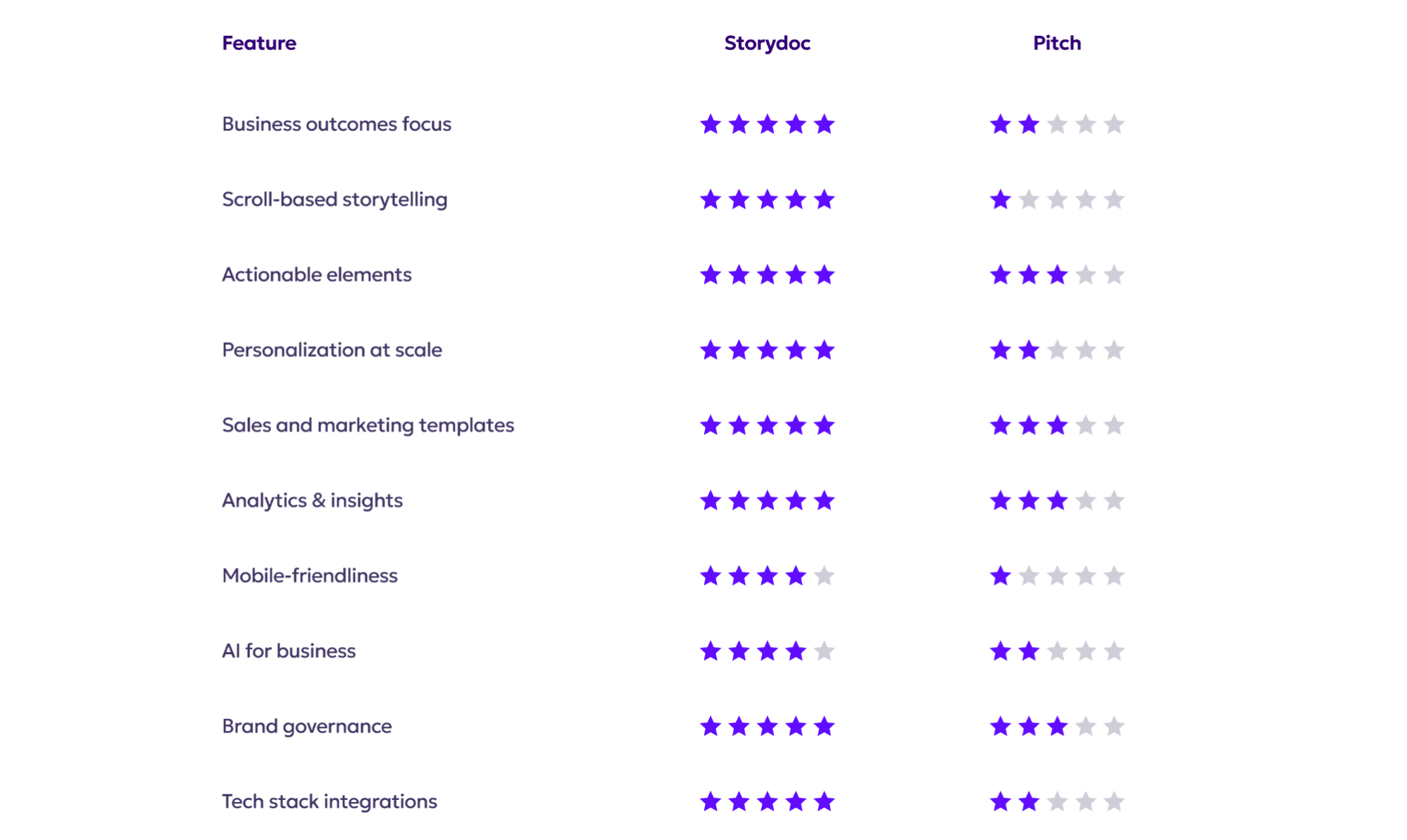
Quick comparison guide

Storydoc vs. Pitch
Storydoc vs. Pitch

Built for business outcomes

Storydoc vs. Pitch

Designed around conversion, with content formats built to capture leads, book meetings, and move deals forward

Sales templates follow real buyer journeys, combining narrative structure with built-in actions that support progression through the funnel

Built for end-to-end B2B workflows, from first touch to signed agreement, without relying on external tools to fill the gaps

Storydoc vs. Pitch

Strong at helping teams create and share decks quickly, which supports internal communications and early-stage pitching

Great for graphics, not for growth.

Features like pitch rooms and controlled sharing help manage how content is accessed, but don’t directly drive conversion

Storydoc vs. Pitch
Storydoc vs. Pitch
Storydoc vs. Pitch

Scroll-based storytelling

Storydoc vs. Pitch

Reads like a website: you scroll smoothly from top to bottom instead of clicking through slides

Makes longer stories easier to follow, because context comes first and details appear as you keep scrolling or click through tabs

Well suited for async selling, where buyers explore the content on their own without guidance

Storydoc vs. Pitch

Uses a slide-by-slide format, so readers have to click forward instead of scrolling naturally

Narrative often breaks as users click between slides, which also reduces user engagement

Better suited for real-time delivery than solo consumption

Storydoc vs. Pitch
Storydoc vs. Pitch
Storydoc vs. Pitch

Actionable elements

Storydoc vs. Pitch

Native CTAs, calendars, and forms let buyers take action directly within the content

Buyers can move forward in the same flow, including signing and payments when used for closing workflows

Helps move buyers through the funnel instead of sending them elsewhere to act

Storydoc vs. Pitch

Supports buttons, links, and embeds scheduling tools like Calendly or Google Calendar booking pages

You can embed forms (Typeform, HubSpot Forms, Tally, etc.) to capture leads inside slides

No native e-signatures or payment modules - closing actions typically happen outside Pitch

Storydoc vs. Pitch
Storydoc vs. Pitch
Storydoc vs. Pitch

Personalization at scale

Storydoc vs. Pitch

Dynamically pulls client names, logos, industries, and more from your CRM or spreadsheet

Zapier + native integrations make mass-personalization seamless

You can bulk send personalized decks with no recipient limits, which is perfect for outbound, ABM, or proposals at scale

Storydoc vs. Pitch

HubSpot integration can create pitch rooms prefilled with company details

Salesforce CRM integration is listed as coming soon / on the roadmap, so it’s not something you can fully rely on today

Scaling personalization beyond those cases typically means building your own automation layer and governance around it

Storydoc vs. Pitch
Storydoc vs. Pitch
Storydoc vs. Pitch

Tailored for sales & marketing

Storydoc vs. Pitch

Purpose-built for creating sales and marketing assets that support real buying decisions

Ready-made templates for sales decks, proposals, case studies, reports, and more

Built-in interactive elements (e.g. timeline, ROI calculator, dynamic pricing)

Storydoc vs. Pitch

Offers sales and marketing templates, but they rely largely on placeholder text rather than built-in sales logic

Tables, numbers, and data visualizations are static, with no sales-native interactivity behind them

Better suited for first-contact pitches than full funnel conversion

Storydoc vs. Pitch
Storydoc vs. Pitch
Storydoc vs. Pitch

Performance tracking & insights

Storydoc vs. Pitch

Tracks concrete engagement metrics like opens, scroll depth, time spent per section, CTA clicks, and interaction behavior

Real-time alerts help reps follow up while intent is hot

Engagement data flows into your CRM and tools, so follow-ups are guided by how each prospect actually interacted

Storydoc vs. Pitch

Strong engagement analytics: knows who opened, where/when, and provides slide-level insights

Sharing controls let you see who accessed the deck and prevent unintended access, which keeps analytics accurate

Analytics live mainly in Pitch; it’s not inherently a CRM signal engine unless you build that linkage

Storydoc vs. Pitch
Storydoc vs. Pitch
Storydoc vs. Pitch

Mobile performance

Storydoc vs. Pitch

Built mobile-first for real buyer behavior, with a large share of decks opened on phones between meetings

Interactive layouts adapt cleanly to smaller screens, with no need to pinch or zoom

CTAs, forms, and next steps remain clear and easy to act on

Storydoc vs. Pitch

Decks are technically viewable on mobile, but templates are largely static and not optimized for small screens

Slide-by-slide navigation feels similar to clicking through a PowerPoint or PDF on a phone

Reading dense slides and tables on mobile often requires zooming, which makes completing actions harder

Storydoc vs. Pitch
Storydoc vs. Pitch
Storydoc vs. Pitch

AI-powered content creation

Storydoc vs. Pitch

StoryBrain lets you upload and manage your own materials (docs, decks, websites) and use them to generate personalized business documents

You can update StoryBrain’s knowledge at any time, then edit or regenerate any slide or section using AI as deals change

Cuts hours of manual work, especially for sales and marketing teams

Storydoc vs. Pitch

Pitch's AI is geared toward quickly generating slide-based presentations from prompts, outlines, or short inputs

Best at helping teams get to a clean, well-designed first draft, rather than building on deep business or deal context

Output focuses on structure and wording of slides, not on conversion logic or sales-specific storytelling

Storydoc vs. Pitch
Storydoc vs. Pitch
Storydoc vs. Pitch

Brand guardrails & governance

Storydoc vs. Pitch

Built for organizations that need control and consistency, with enterprise-grade security standards including ISO 27001

Central workspaces, shared templates, and role-based permissions make it easy to scale content without losing control

Gives teams freedom to move quickly while keeping brand, legal, and compliance standards intact

Storydoc vs. Pitch

Strong collaboration features and shared templates help teams stay visually aligned

Sharing controls (passcodes, access limits, revoke links) cover the basics of content access

Does not currently offer ISO 27001 or comparable enterprise compliance certifications

Storydoc vs. Pitch
Storydoc vs. Pitch
Storydoc vs. Pitch

Tech stack integrations

Storydoc vs. Pitch

Supports 3,000+ apps via Zapier, plus native integrations (HubSpot, Salesforce, Pipedrive, and more)

Lets you automatically generate hundreds of personalized decks from CRM data or spreadsheets

Designed for closed-loop workflows, where engagement data flows back to the tools teams already rely on

Storydoc vs. Pitch

Integrations focus mainly on design and productivity apps rather than sales system workflows

No native Salesforce integration and no Zapier-based automation layer available today

Works well alongside other tools, but isn’t built to orchestrate CRM-driven sales processes

Storydoc vs. Pitch

So, what’s it going to be?

Do you want a presentation tool that helps you design professional slides - or a system built to turn sales content into action?

Pitch is great if you want a beautiful static deck.
But if your goal is to personalize at scale, move deals across the funnel, and actually close - Storydoc is what you need.


It’s time to stop sending static slides and start driving results with Storydoc.

Storydoc vs. Pitch