Storydoc vs PowerPoint

Live presentations are out - async selling is in

PowerPoint was built for a different era - when deals happened face-to-face and presentations were shown live. But in today’s async-first world, that old format can’t keep up. It stalls your momentum, kills your conversion, and leaves your prospects with nowhere to go.

You need more than just slides. You need a format that does the selling for you. You need...

Storydoc.

Storydoc vs PowerPoint

Quick comparison guide

Storydoc vs PowerPoint

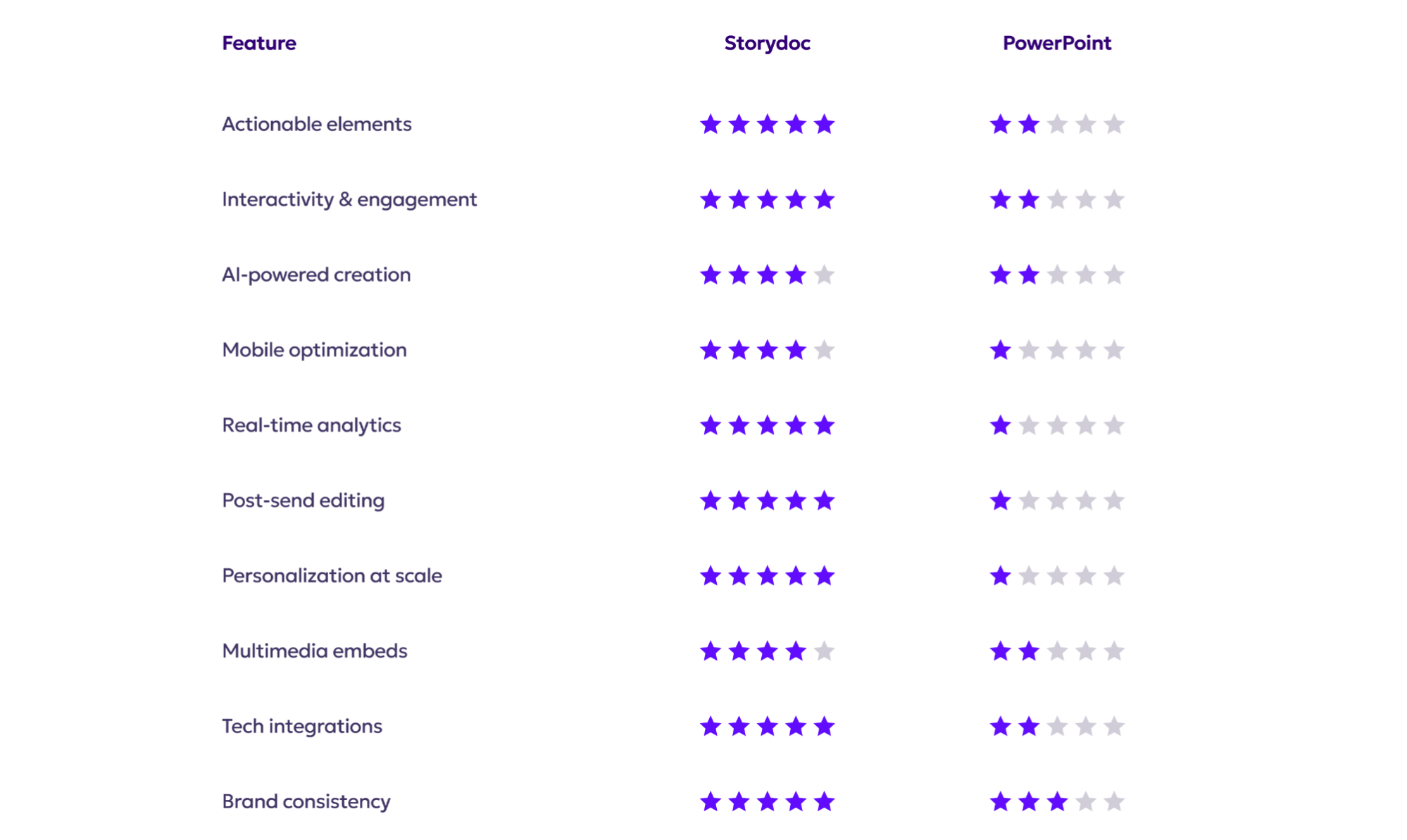
Actionable vs passive

Storydoc vs PowerPoint

Built from the ground up for async sales and marketing.

Guides your audience toward conversion with embedded CTAs.

Drives 2x more demos and 30% faster deal cycles.

Storydoc vs PowerPoint

Created for live presentations, not async distribution.

Leaves viewers hanging with no clear next step.

Slows down your pipeline and adds friction, resulting in lost opportunities.

Storydoc vs PowerPoint

Interactivity & engagement

Storydoc vs PowerPoint

Integrates clickable tabs, sliders, and collapsible sections to keep content digestible and engaging.

Personalized experiences that adapt to how users engage.

Evidence-backed results of 41% more decks read in full and 21% boost in average reading time.

Storydoc vs PowerPoint

Static and linear - forces your audience to scroll through multiple slides.

One-size-fits-all experience. A missed storytelling opportunity.

Viewers disengage quickly, with low retention rates.

Storydoc vs PowerPoint

AI-powered creation

Storydoc vs PowerPoint

Automatically generates a complete deck designed to boost conversion.

Smart image selection and layout generation in seconds.

Built-in AI for rewriting, translating, and polishing copy.

Storydoc vs PowerPoint

Basic AI assistance limited to text editing. No conversion-boosting features.

No visuals, layout, or design suggestions.

Time-consuming manual creation process.

Storydoc vs PowerPoint

Mobile performance

Storydoc vs PowerPoint

Fully optimized to offer the same engaging experience on any device.

Scrollable layouts that adapt to any screen size.

47% of outreach decks are opened on mobile - Storydoc nails the experience.

Storydoc vs PowerPoint

Difficult to navigate on small screens. A pinch and zoom nightmare.

Layouts break or shrink text beyond readability.

Stalls your first impression with mobile-first buyers.

Storydoc vs PowerPoint

Real-time analytics

Storydoc vs PowerPoint

Full funnel visibility - open rates, scroll depth, time spent, engagement rate, and button clicks.

Know exactly who’s engaged and what caught their attention.

Smart Alerts so you can follow up at the right time and secure the deal.

Storydoc vs PowerPoint

Zero data for sales optimization or follow up insights.

You send and hope for the best - no funnel visibility.

Zero native analytics or engagement tracking.

Storydoc vs PowerPoint

Post-send control

Storydoc vs PowerPoint

Edit and update your deck even after you’ve sent it.

Always share a live link with the latest version. Edit it on the go.

Fix typos or update content without resending.

Storydoc vs PowerPoint

Each change requires resaving and resending the file.

Customers end up with outdated decks.

Creates confusion and friction among your buyers.

Storydoc vs PowerPoint

Personalization at scale

Storydoc vs PowerPoint

Natively integrates your CRM data to generate thousands of personalized decks, at scale.

Bulk send multiple decks in one click.

Create decks directly from your CRM - an all-in-one growth experience.

Storydoc vs PowerPoint

Manual duplication and editing for each recipient.

Increases your team’s workload and room for error.

Impossible to scale your outreach with personalized documents.

Storydoc vs PowerPoint

Multimedia-first experience

Storydoc vs PowerPoint

Embed calendars, videos, forms, maps, and more - natively.

Keep your content all in one place and avoid losing leads on the way.

Turn passive viewers into active participants (and track the activity).

Storydoc vs PowerPoint

Limited support for embedded content. Zero conversion integration.

A multiple-window chaos that adds friction and slows the deal.

A clunky and fragmented experience.

Storydoc vs PowerPoint

Tech ecosystem integration

Storydoc vs PowerPoint

Connects seamlessly with all your marketing and sales stack.

Works natively with Salesforce, HubSpot, Gong, and more.

Open API support for custom integrations that adapt to your workflow.

Storydoc vs PowerPoint

No meaningful integration with modern B2B tools.

Functions in isolation from your tech stack, creating a gap in your workflow.

A missed opportunitiy for automation and scalability.

Storydoc vs PowerPoint

Modern branding & consistency

Storydoc vs PowerPoint

All templates follow your brand guidelines automatically.

Shared workspaces and smart permission levels to ensure team-wide consistency.

Easily scalable across teams and departments, without risking design breaks.

Storydoc vs PowerPoint

Design freedom falls entirely on individual users.

Inconsistent branding across decks.

No built-in guardrails to avoid unnecessary edits.

Storydoc vs PowerPoint

So, what’s it going to be?


Do you want to build documents that present - or ones that convert?

PowerPoint may have been the standard for internal meetings.
But Storydoc is built for modern, async sales.

It’s time to leave static slides behind and start winning with Storydoc.

Storydoc vs PowerPoint