Storydoc vs. Qwilr

Qwilr is great at sending basic proposals and price quotes.

But if you're looking to engage leads throughout the entire funnel, stand out from your competitors, and guide prospects toward action, not just approval, then you need a Qwilr alternative that does it for you.

You need a tool like Qwilr, which also transforms static sales content into an interactive journey that converts. You need…
Storydoc.

Storydoc vs Qwilr

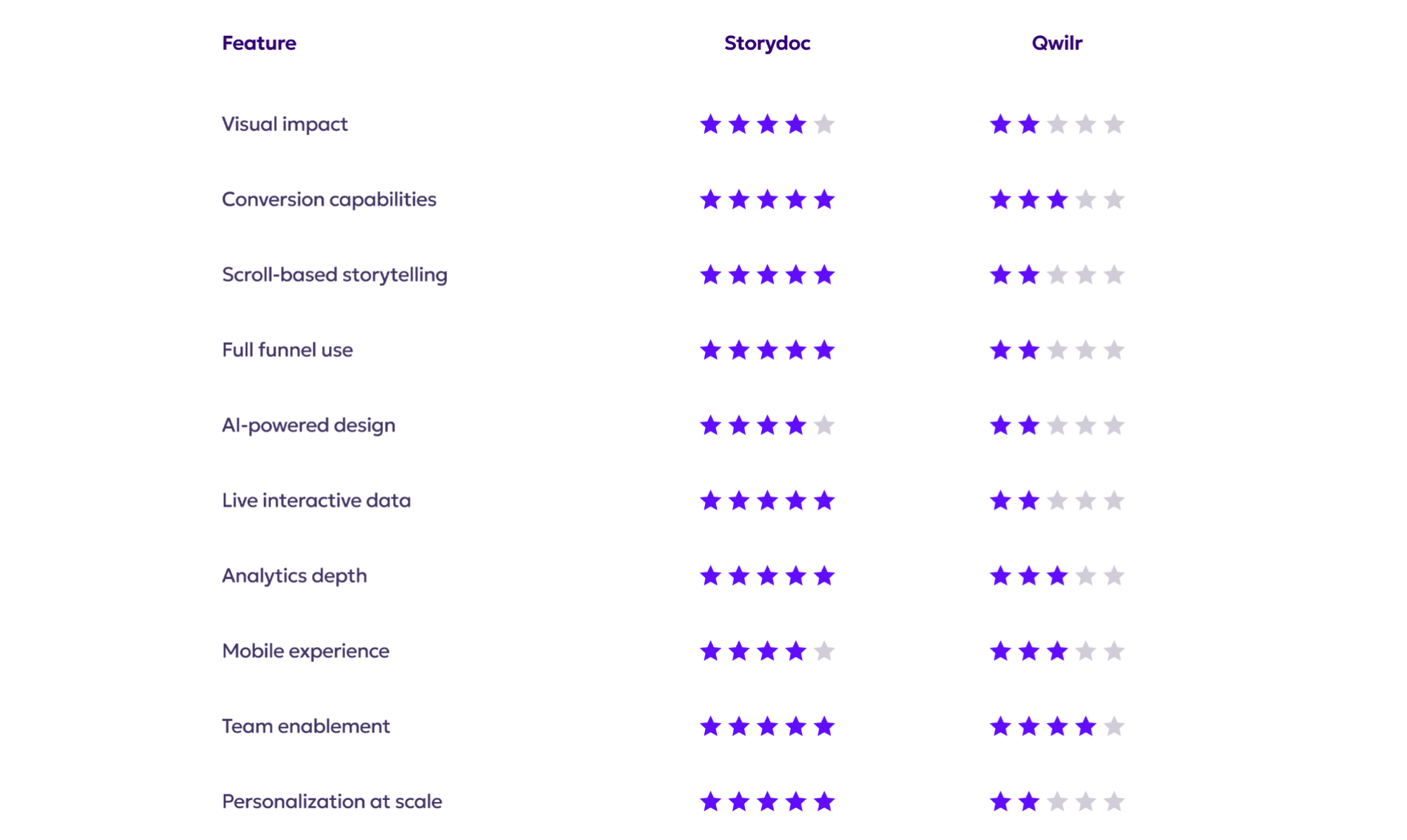
Quick comparison guide

Storydoc vs Qwilr

Templates designed to impress

Storydoc vs Qwilr

Conversion-led templates designed around persuasive sales narratives, not just visual layout

Interactive elements (dynamic charts, embedded media, CTAs) are built into templates by default

Components can be reused and auto-personalized from your CRM, making decks scalable

Storydoc vs Qwilr

Visually clean templates that are simple and professional but lack “wow” factor

Block sections speed up basic proposals but lack depth for complex sales narratives

Limited interactivity and reuse - most templates still require manual editing per deal

Storydoc vs Qwilr
Storydoc vs Qwilr
Storydoc vs Qwilr

Conversion-driven vs. proposal-centric

Storydoc vs Qwilr

Storydoc was built with conversion at its core - CTAs, calendars, forms, and contract signing baked in

Helps you convert leads at every step of the journey

Not just for closing deals - but for creating them

Storydoc vs Qwilr

Qwilr focuses solely on the proposal stage

Limited to bottom-funnel documents like quotes and contracts

Doesn’t help with lead nurturing or early-stage engagement

Storydoc vs Qwilr
Storydoc vs Qwilr
Storydoc vs Qwilr

Scroll-based storytelling

Storydoc vs Qwilr

Uses a continuous scroll format enhanced with tabs, narrator slides, and progressive reveal to actively guide the reader through the story

Grays out non-active content and surfaces key messages at the right moment, keeping attention focused and reducing cognitive overload

Feels closer to a guided product story or microsite than a document, which works especially well for longer, complex sales narratives

Storydoc vs Qwilr

Web-based pages scroll vertically, but the experience remains section-by-section rather than narrative-led

Lacks guided storytelling elements like narrator slides or staged content reveal, so the reader controls the flow entirely

Works well for straightforward proposals, but offers limited support for leading the buyer through a structured sales story

Storydoc vs Qwilr
Storydoc vs Qwilr
Storydoc vs Qwilr

Full stack vs. only proposals

Storydoc vs Qwilr

One platform for sales decks, pitch decks, proposals, reports, and much more

Consistent look and feel across all external communications

Save time by reusing content across funnel stages

Storydoc vs Qwilr

Focuses narrowly on proposals and quotes

You need other tools for top-of-funnel content

Creates dead spots across your content strategy

Storydoc vs Qwilr
Storydoc vs Qwilr
Storydoc vs Qwilr

AI-powered design

Storydoc vs Qwilr

Pre-built templates and AI generation to help you hit the ground running

StoryBrain lets you upload existing decks, documents, links, brand voice files, and reference materials to generate a complete, on-brand deck

Output is reusable across the full funnel (sales decks, proposals, reports), not locked into a single proposal format

Storydoc vs Qwilr

AI creator can generate a proposal by scanning your website and applying basic structure and styling

Output typically requires more manual refinement to adjust messaging, layout, and narrative flow

AI is limited to proposal and quote creation and does not support broader inputs like existing decks or brand documents

Storydoc vs Qwilr
Storydoc vs Qwilr
Storydoc vs Qwilr

Live interactive data

Storydoc vs Qwilr

Lets you present live, interactive charts and dashboards that behave like a web report, not static images

Data components are mobile-friendly and interactive, so charts remain usable on smaller screens

Supports interactive ROI calculators and dynamic data blocks that update as the viewer engages

Storydoc vs Qwilr

Strong for interactive pricing and ROI calculators within proposals

Charts are largely static or table-based rather than truly interactive

On mobile, wide tables with multiple columns require horizontal scrolling to view all data

Storydoc vs Qwilr
Storydoc vs Qwilr
Storydoc vs Qwilr

Engagement analytics depth

Storydoc vs Qwilr

Tracks deep engagement signals like scroll depth, time spent per section, CTA clicks, and slide-level interactions

Sends real-time alerts and syncs all activity data back to your CRM, so every view becomes actionable sales intelligence

Connects with tools like Google Analytics and HubSpot, feeding document engagement into your wider funnel reporting

Storydoc vs Qwilr

Gives you block-by-block engagement insights plus interaction tracking, so you can see what buyers read, click, and engage with

Shows a full proposal timeline and key buyer signals (e.g. sharing, quote changes, abandoned signing) with real-time notifications

Analytics are centred on proposals and quotes rather than the full-funnel content journey, so your visibility tends to stop at proposal engagement

Storydoc vs Qwilr
Storydoc vs Qwilr

Mobile reading experience

Storydoc vs Qwilr

Fully responsive layouts that feel like a native mobile experience.

Readable, scrollable, and clickable on any screen.

Helps teams engage on-the-go decision-makers.

Storydoc vs Qwilr

Works on mobile but isn’t fully optimized.

Some elements don’t adapt cleanly to small screens.

Awkward navigation in some formats.

Storydoc vs Qwilr
Storydoc vs Qwilr
Storydoc vs Qwilr

Team enablement

Storydoc vs Qwilr

Enterprise-grade security with ISO-certified infrastructure, SSO/SAML, and role-based permissions supports org-wide adoption

Real-time collaboration lets multiple team members edit and review simultaneously without version conflicts

Shared workspaces, reusable brand assets, and admin controls ensure consistent, on-brand content across the whole team

Storydoc vs Qwilr

You can organize proposals and assets into shared folders and build a central library of approved text/media

Team workspaces allow multiple users to collaborate on proposals using shared templates and folders

Standard security measures protect content, but lack the ISO certification and enterprise governance workflows built into Storydoc

Storydoc vs Qwilr
Storydoc vs Qwilr
Storydoc vs Qwilr

Personalization at scale

Storydoc vs Qwilr

You can instantly personalize content at scale by integrating directly with your CRM data

Lets you bulk-send multiple customized decks in one click, with no recipient limits

Connects natively to your CRM, generating and updating decks as part of your sales workflow

Storydoc vs Qwilr

Useful for personalizing basic fields, but deeper content customization is limited

CRM integrations do not automatically generate Qwilr pages without using APIs or automation tools like Zapier

Proposals are typically created one by one, adding manual steps as volume increases

Storydoc vs Qwilr
Storydoc vs Qwilr

So, what’s it going to be?

Do you want to send standard-looking proposals, or decks that stand out and wow your customers?

Qwilr helps you get the job done.
Storydoc is similar to Qwilr, but also helps you stand out, impress, and win more deals with interactive, on-brand experiences.


It’s time to stop blending in and start closing with impact.

Storydoc vs Qwilr