15 Best Workflow Automation Tools for Modern Teams

Looking for the best workflow automation software? Compare the top workflow automation tools for sales, operations, project management, and enterprise automation in 2026.

Best workflow automation tools

helped business
professionals at:

WorkDay IHeart Meta Nice American Cancer Society Xerox

Short answer

What are the best workflow automation tools?

The best workflow automation tools are:

  1. Storydoc

  2. Zapier

  3. Make

  4. n8n

  5. Monday

  6. Asana

  7. ClickUp

  8. Outreach

  9. Salesloft

  10. Microsoft Power Automate

  11. MuleSoft

  12. Boomi

  13. Frends

  14. ServiceNow

  15. Nintex

Most teams don't realize just how much time disappears into repetitive work until they start adding it up.

Updating spreadsheets, moving data between apps, sending follow-up emails, assigning tasks manually, copying customer information from one system to another…

None of these tasks are difficult on their own, but together, they slowly take over the day.

According to recent research by Kissflow, 94% of companies spend time on these manual tasks. That's right - 94%. At that point, it's probably easier to list the companies that aren't doing it.

Workflow automation tools help businesses remove that exact kind of repetitive work by connecting systems, triggering actions automatically, and reducing the number of manual steps employees need to perform every day.

In this guide, we'll compare the best workflow automation tools available in 2026, including no-code automation platforms, project management systems, enterprise integration software, and AI-powered workflow tools.

What is a workflow automation tool?

A workflow automation tool helps teams eliminate repetitive work by automatically moving information, tasks, and actions between systems.


For example:

  • A lead submits a form and gets added to the CRM automatically.

  • A signed proposal creates a project in ClickUp.

  • A Slack notification gets triggered when a contract is approved.

  • An onboarding workflow creates accounts, sends emails, and assigns training tasks without HR manually coordinating every step.


Instead of employees repeating the same actions every day, the software handles those steps automatically based on predefined rules and triggers.

Some workflow automation tools focus on simple no-code automations between apps. Others are designed for enterprise-scale operations involving approvals, AI agents, data governance, and complex system integrations.

What are the benefits of workflow automation?

Spend less time on repetitive work

Most workflow automation projects start with a simple goal: stop wasting time on tasks that don't need to be done manually anymore.

Activities like updating CRM records, sending notifications, routing approvals, creating invoices, assigning tasks, and moving information between systems often follow the same predictable process every time.

While none of them are particularly difficult, they can consume a surprising amount of time when repeated across an entire team.

Workflow automation software removes much of that administrative work, allowing teams to spend more time on work that actually requires human attention.


Reduce manual errors

Manual processes create opportunities for mistakes.

Customer information gets copied incorrectly, approvals are overlooked, teams end up working from outdated spreadsheets, and records stop matching across different systems.

The more handoffs are involved in a process, the easier it becomes for something to fall through the cracks.

Workflow automation helps reduce those risks by automatically handling the steps that would otherwise depend on someone remembering to do them.

Instead of relying on manual updates and handoffs, teams can follow the same process every time, reducing the chances of information being missed, duplicated, or entered incorrectly.


Eliminate context switching

One of the biggest hidden productivity drains is constantly jumping between tools.

A task starts in Slack, moves to email, gets updated in the CRM, then ends up in a spreadsheet someone forgot to update.

Workflow automation tools connect those systems together so information moves automatically instead of relying on employees to manually transfer it between platforms.


Improve visibility across teams

Most operational bottlenecks aren't obvious until work starts piling up.

Automation platforms give teams visibility into how workflows actually perform. Managers can see where approvals slow down, which processes fail most often, and where tasks are getting stuck.

That visibility makes it much easier to improve processes over time instead of relying on assumptions.


Scale operations without constantly hiring

As businesses grow, operational complexity grows with them.

Without automation, scaling often means hiring more people to manage approvals, data entry, onboarding, reporting, and coordination work.

Automation helps organizations handle larger volumes of work without needing to add people every time a process becomes more complex.


Respond faster to customers and leads

Research shows the first vendor to respond to a buyer wins the deal nearly 80% of the time.

Workflow automation helps businesses react faster by triggering follow-ups, routing requests, assigning tasks, generating proposals, and notifying teams automatically instead of waiting for someone to notice the next step manually.

What features should you look for in workflow automation software?

Integrations that eliminate manual work

Automation is only useful if your systems can actually communicate with each other.

If employees still need to manually move information between tools, update records by hand, or trigger processes themselves, much of the value disappears.

The best workflow automation tools connect directly to the systems teams already use every day.

The fewer manual handoffs your team needs to perform, the more valuable automation becomes.


No-code builders

Not every automation project should require engineering resources.

Many modern platforms allow non-technical teams to create workflows using visual editors, drag-and-drop builders, templates, and natural language prompts.

The easier workflows are to build and maintain, the faster teams can automate repetitive work without depending entirely on developers.


AI that reduces setup time

AI is quickly becoming a standard part of workflow automation software.

The useful implementations go far beyond chatbot-style assistants.


Some platforms can:

  • generate workflows from plain English instructions

  • recommend automation logic

  • summarize activity automatically

  • prioritize tasks using buyer intent signals

  • orchestrate AI agents across multiple systems


Workflow visibility and monitoring

Teams need to know:

  • whether automations are running correctly

  • where processes are slowing down

  • which steps fail most often

  • how workflows perform over time


The best platforms provide dashboards, execution logs, alerts, and reporting that make troubleshooting and optimization much easier.


Governance and permissions

Without proper controls, teams can accidentally create conflicting workflows, expose sensitive data, or automate processes that should require approvals.


Larger organizations should look for:

  • role-based permissions

  • audit logs

  • SSO support

  • compliance controls

  • data governance tools

  • approval routing

  • self-hosting options where necessary


Pricing that scales predictably

Some automation platforms look inexpensive at first but become much more expensive as workflow volume increases.

That's especially common with execution-based pricing models.


Before choosing a workflow automation platform, look closely at:

  • task limits

  • operation limits

  • overage pricing

  • user minimums

  • premium integrations

  • AI usage caps

How we evaluated the best workflow automation tools

To identify the best workflow automation software, we evaluated each platform across 6 key areas:

Evaluation area What we looked for

Ease of use

How quickly teams can build and maintain workflows

Integration depth

Native integrations, APIs, and data synchronization capabilities

AI capabilities

AI-assisted workflow generation, orchestration, and automation features

Scalability

Whether pricing and infrastructure remain practical as workflow volume grows

Governance and security

Permissions, audit logs, compliance support, and self-hosting options

Workflow flexibility

Support for branching logic, approvals, data transformations, and multi-step automation

We also looked at how well each platform fits real operational workflows instead of simply comparing feature lists.

Some tools are excellent for quick no-code automations but struggle with complexity at scale. Others are incredibly powerful but require technical teams to manage them effectively.

The goal of this guide isn't to declare one universal winner, but to help you identify which workflow automation platform fits the way your organization actually works.

Best workflow automation tools compared

Tool Details
Storydoc

Best for: Interactive sales workflows and proposal automation

No-code: Yes

AI features: Advanced

Hosting: SaaS cloud

Starting price: $19.80/user/month

Outreach

Best for: Enterprise outbound sales workflows

No-code: Low-code

AI features: Advanced

Hosting: SaaS cloud

Starting price: Custom pricing

Salesloft

Best for: Revenue orchestration and buyer signals

No-code: Low-code

AI features: Advanced

Hosting: SaaS cloud

Starting price: Custom pricing

Zapier

Best for: Simple no-code app automations

No-code: Yes

AI features: Yes

Hosting: SaaS cloud

Starting price: Free plan available

Make

Best for: Complex visual workflows

No-code: Low-code

AI features: Limited

Hosting: SaaS cloud

Starting price: Free plan available

n8n

Best for: Self-hosted AI and developer workflows

No-code: Low-code

AI features: Advanced

Hosting: Hybrid / self-hosted

Starting price: Free self-hosted

Monday

Best for: Visual project and workflow management

No-code: Yes

AI features: Moderate

Hosting: SaaS cloud

Starting price: $12/user/month

Asana

Best for: Structured project execution and automation

No-code: Yes

AI features: Moderate

Hosting: SaaS cloud

Starting price: Free plan available

ClickUp

Best for: All-in-one work management

No-code: Yes

AI features: Yes

Hosting: SaaS cloud

Starting price: Free plan available

MuleSoft

Best for: Enterprise API integrations

No-code: Developer-focused

AI features: Limited

Hosting: Hybrid / on-prem

Starting price: Custom pricing

Boomi

Best for: Hybrid enterprise integrations

No-code: Low-code

AI features: Moderate

Hosting: Hybrid cloud

Starting price: Custom pricing

Frends

Best for: Microsoft-focused enterprise iPaaS

No-code: Developer-focused

AI features: Moderate

Hosting: Hybrid cloud

Starting price: Custom pricing

Microsoft Power Automate

Best for: Microsoft ecosystem automation

No-code: Low-code

AI features: Advanced

Hosting: SaaS cloud

Starting price: $15/user/month

ServiceNow

Best for: Enterprise workflow governance

No-code: Low-code

AI features: Advanced

Hosting: Hybrid enterprise

Starting price: Custom pricing

Nintex

Best for: Enterprise approvals and document workflows

No-code: Low-code

AI features: Moderate

Hosting: Hybrid cloud

Starting price: Custom pricing

Best sales and revenue workflow automation tools

1. Storydoc

Best for: Sales teams that want proposal automation, buyer engagement tracking, CRM-driven personalization, and interactive sales workflows in one platform.

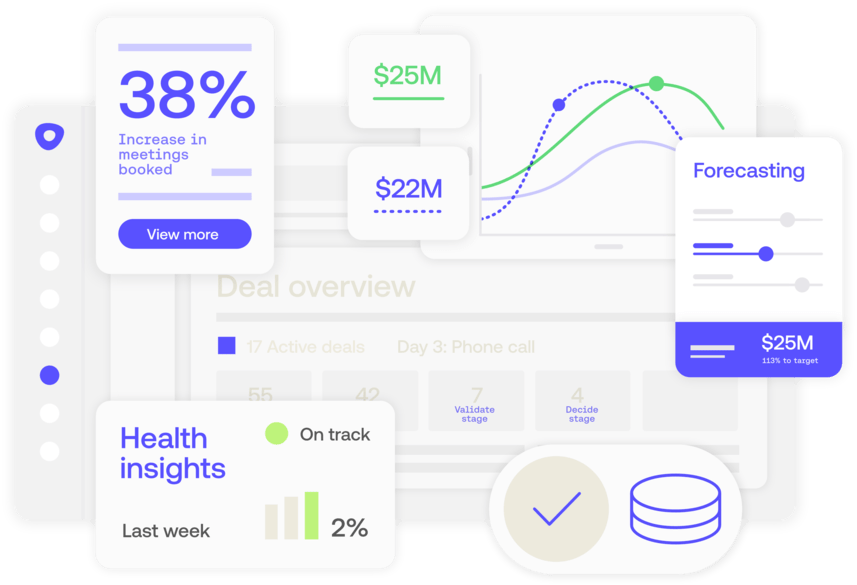
Best workflow automation tools - Storydoc

Most sales workflows become surprisingly fragmented after the proposal gets sent.

A rep follows up manually. Stakeholders lose the document inside an email thread. Nobody knows whether the buyer reviewed pricing, shared the proposal internally, or stopped reading halfway through.

Storydoc helps sales teams connect those parts of the process into a more trackable workflow.

Instead of treating proposals like static attachments, the platform turns them into interactive web experiences connected directly to CRM data, engagement analytics, personalization variables, and automated follow-up workflows.

Sales teams can generate personalized proposals automatically using CRM data, track buyer engagement in real time, and trigger follow-ups based on how prospects interact with the document.

The platform is particularly strong when it comes to engagement visibility. Teams can see who opened the proposal, how long they spent reviewing different sections, or whether the document was shared internally with additional stakeholders.

AI is another major focus area. Teams can generate proposals, redesign layouts, rewrite content, create visuals, and train the AI using existing sales collateral, websites, and brand guidelines instead of starting from scratch every time.


Key features

  • CRM integrations automatically pull prospect and deal information into proposals, reducing manual updates and repetitive administrative work.

  • Interactive content blocks allow teams to embed videos, forms, pricing options, calendars, contracts, and payment requests directly into sales documents.

  • Real-time analytics show how buyers engage with proposals, including page views, reading time, and internal sharing activity.

  • AI tools can generate proposals, rewrite messaging, redesign layouts, and create sales collateral using existing company content.

  • Brand settings automatically apply company logos, fonts, colors, and design rules across all documents.


Pros

  • Buyers can review pricing, watch videos, sign agreements, and book meetings without leaving the proposal experience.

  • Personalization goes far beyond basic merge fields and can dynamically adapt content using CRM data.

  • Engagement analytics give sales teams clear visibility into buyer intent and proposal activity.

  • Proposals automatically adapt to desktop and mobile devices without requiring separate versions.

  • Teams can update proposals after sending them without breaking the original link.


Cons

  • Teams accustomed to PowerPoint or Word-based proposal workflows may need some time to adjust.

  • Organizations focused purely on contract approvals may not need the broader sales engagement functionality.

  • Interactive experiences lose some of their value when exported into static PDFs.


Pricing

  • Starter: $19.80/user/month (billed annually)

  • Pro: $36/user/month (billed annually)

  • Teams: Custom pricing

2. Outreach

Best for: Enterprise sales organizations running large-scale outbound workflows and multi-channel sales engagement.

Best workflow automation tools - Outreach

Outreach is built around a simple idea: sales reps shouldn't have to manually coordinate every follow-up step themselves.

The platform helps revenue teams automate outbound sequences, prioritize daily activities, manage pipeline workflows, and standardize sales execution across large organizations.

Email sequences, phone tasks, LinkedIn touchpoints, pipeline updates, forecasting, and conversational intelligence all live inside the same environment.

One of Outreach's biggest strengths is operational consistency. Sales leaders can create structured workflows that guide reps through outbound activity while keeping CRM data synchronized automatically in the background.

The platform also leans heavily into AI. Outreach's Kaia assistant provides real-time call transcription, automated summaries, coaching prompts, and contextual recommendations during meetings, helping reps focus more on conversations and less on note-taking.

For enterprise sales teams managing large outbound volumes, that level of coordination can remove a surprising amount of repetitive work.

The trade-off is complexity. Outreach is significantly more sophisticated than many smaller sales automation platforms, which means onboarding, implementation, and workflow configuration often require dedicated RevOps support.


Key features

  • Multi-channel outbound sequences combine emails, calls, LinkedIn tasks, and automated follow-up workflows in one system.

  • AI-powered conversational intelligence automatically records, summarizes, and analyzes sales calls.

  • Deal scoring and pipeline forecasting tools help managers identify pipeline risk earlier.

  • Salesforce integrations synchronize sales activity, pipeline updates, and engagement data automatically.

  • Workflow automation rules standardize outbound processes across larger revenue teams.


Pros

  • Large sales organizations can standardize outbound execution across hundreds of reps.

  • AI-powered call summaries reduce manual note-taking and administrative work.

  • Sequence automation helps reps manage larger outbound volumes more consistently.

  • Salesforce governance and permissions are particularly strong for enterprise teams.


Cons

  • Initial implementation can take significantly longer than simpler sales automation platforms.

  • The platform has a steeper learning curve for newly onboarded sales reps.

  • Pricing can become difficult to justify for smaller businesses or midmarket teams.


Pricing

Custom pricing

3. Salesloft

Best for: Revenue teams that want sales engagement automation combined with buyer intent signals, coaching, and pipeline visibility.

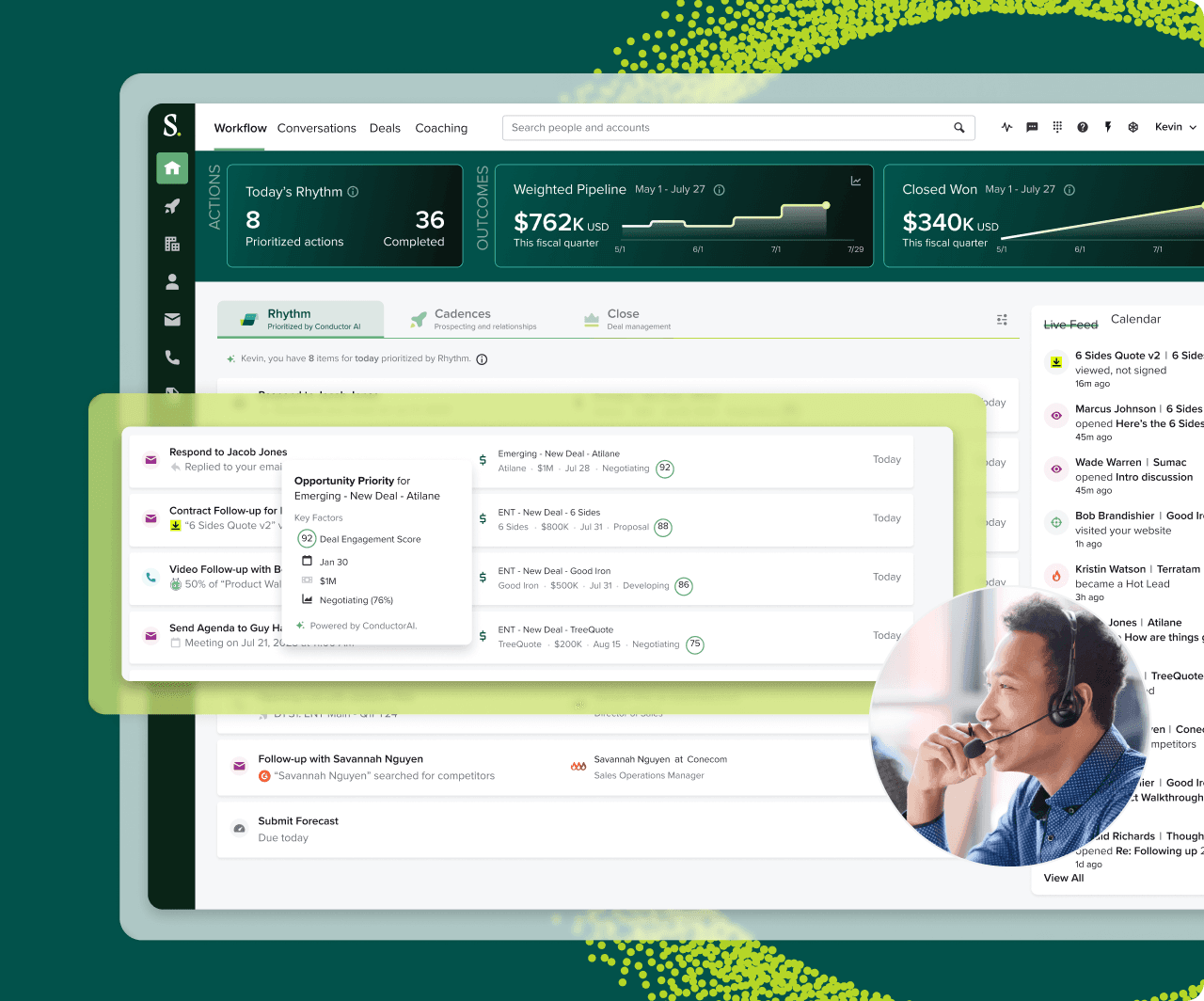
Best workflow automation tools - Salesloft

Sales teams generate more activity data than ever before.

Every email open, meeting attended, proposal viewed, website visit, and call recording creates another signal that could indicate buying intent.

Having access to all that information is valuable, but it also makes prioritization more difficult because not every signal deserves the same level of attention.

Salesloft helps revenue teams prioritize activity based on buyer behavior instead of relying on static task lists and manual follow-up routines.

The platform combines outbound automation, conversational intelligence, forecasting, pipeline management, and coaching tools into one workflow system.

Reps can manage sequences, calls, meetings, follow-ups, and deal progression without constantly switching between disconnected platforms.

One area where Salesloft stands out is usability. Compared to some enterprise-heavy competitors, the interface feels easier to navigate and generally requires less onboarding time for new reps.

The Rhythm AI engine also analyzes buyer signals and recommends which opportunities deserve attention first.

For revenue teams managing large pipelines, that prioritization can help reps spend more time on deals showing genuine buying intent.

However, not everything is included from day one. Salesloft offers a wide range of functionality, but the exact capabilities depend on your contract, and costs can increase as teams add more features over time.


Key features

  • Rhythm AI prioritizes daily sales activity based on buyer engagement signals and pipeline behavior.

  • Multi-channel workflows combine emails, calls, tasks, meetings, and follow-up automation inside one system.

  • Conversational intelligence tools automatically record, transcribe, and analyze sales calls.

  • Forecasting and pipeline management tools provide visibility into deal progression and pipeline health.

  • CRM integrations synchronize activity data across Salesforce, HubSpot, and Microsoft Dynamics.


Pros

  • The interface is easier to learn than many enterprise sales engagement platforms.

  • Buyer intent signals help reps prioritize the opportunities most likely to progress.

  • Coaching and conversational intelligence features support onboarding and sales development.

  • Multi-CRM support provides more flexibility than Salesforce-only ecosystems.


Cons

  • Important functionality such as voice dialing and chatbot tools may require expensive add-ons.

  • Pricing structures can become difficult to predict during contract negotiations.

  • Smaller sales teams may not need the platform's broader revenue orchestration capabilities.


Pricing

Custom pricing

Best no-code workflow automation tools

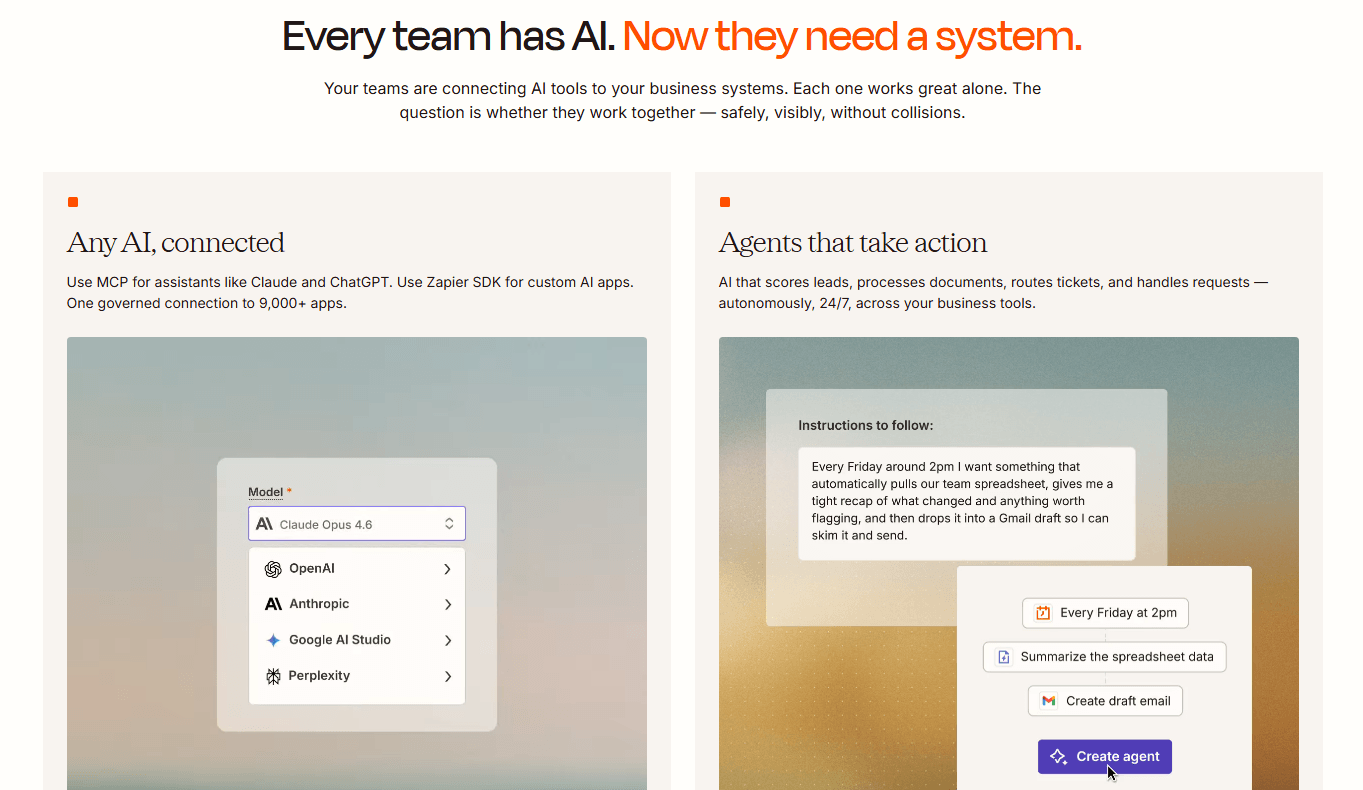
4. Zapier

Best for: Non-technical teams that want fast, simple automations between popular apps.

Best workflow automation tools - Zapier

Most automation projects don't start with enterprise architecture diagrams.

They start with one repetitive task someone no longer wants to do manually.

A lead gets added to a spreadsheet, then someone copies it into the CRM, which triggers a Slack notification and a follow-up email. Then the same process repeats all over again tomorrow.

Zapier became popular because it makes that kind of automation extremely easy to build.

The platform allows teams to connect thousands of apps using simple trigger-and-action workflows without writing code. Most automations can be created in minutes using templates, pre-built integrations, and a visual editor.

For small businesses and non-technical teams, that simplicity is a big advantage.

Zapier also has one of the largest integration ecosystems in the market. Teams can connect CRMs, forms, project management systems, marketing tools, spreadsheets, databases, and communication platforms without needing developers to build custom integrations.

As workflows become more advanced, however, some limitations start to appear. Complex branching logic, large-scale data processing, and high workflow volume can become expensive relatively quickly because pricing scales based on task execution.


Key features

  • More than 7,000 native integrations allow teams to connect popular SaaS platforms without custom development.

  • Visual no-code builders make it possible for non-technical users to create workflows quickly.

  • AI-powered workflow assistance can generate automations using conversational prompts.

  • Multi-step workflows support conditional logic, filters, and automated branching paths.

  • Zapier Tables and Interfaces allow teams to build lightweight internal workflow systems directly inside the platform.


Pros

  • Most teams can start building automations quickly without technical training.

  • The huge integration library makes it easy to connect almost any mainstream SaaS platform.

  • Pre-built templates reduce setup time for common workflows.

  • Reliable cloud infrastructure minimizes maintenance overhead for smaller teams.


Cons

  • Costs can rise quickly once workflow volume and task execution start increasing.

  • Complex workflows with loops and advanced logic are harder to manage than in more flexible platforms.

  • Organizations with strict data privacy requirements may prefer self-hosted alternatives.


Pricing

  • Free: 100 tasks/month

  • Professional: From $19.99/month (billed annually)

  • Team: From $69/month (billed annually)

  • Enterprise: Custom pricing

  • Add-ons available

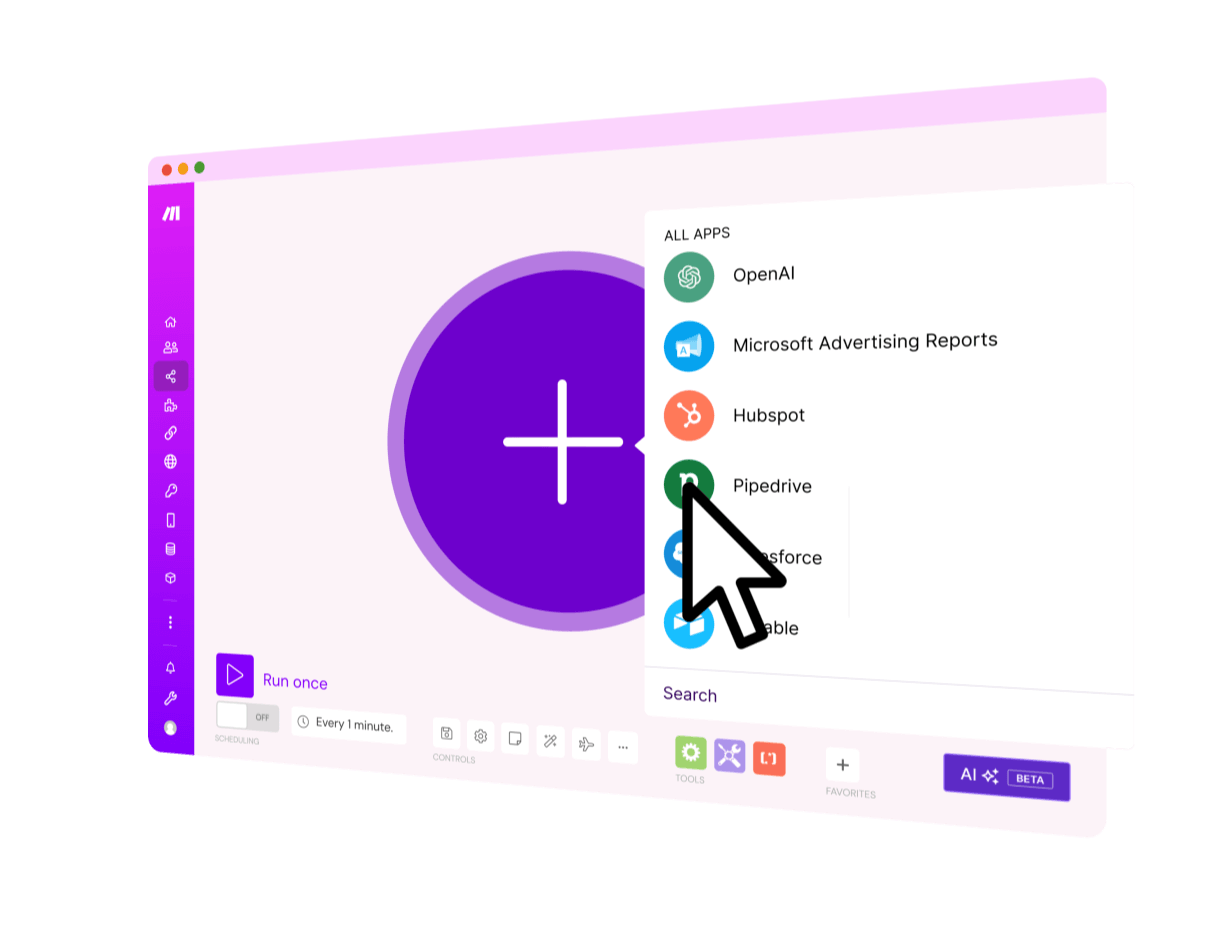
5. Make

Best for: Operations teams that need more advanced workflow logic and visual process design.

Best workflow automation tools - Make

Instead of relying on a basic trigger-and-action structure, Make gives teams a visual canvas where workflows can branch, loop, transform data, and connect multiple systems at once.

That flexibility makes a big difference once automations become more operationally complex.


Teams can build workflows that:

  • process data dynamically

  • route information across multiple systems

  • handle conditional logic

  • iterate through records

  • transform payloads before syncing them elsewhere


For operations teams, the visual workflow builder is one of the platform's biggest strengths. Complex automations remain relatively easy to troubleshoot because the logic is mapped visually instead of hidden behind layers of menus.

Make also tends to scale more affordably than Zapier for high-volume workflows, which is one reason many growing operations teams eventually migrate toward it.

The downside is that non-technical users usually need more time to become comfortable with concepts like routers, iterators, mapping logic, and execution flows.


Key features

  • Visual workflow scenarios allow teams to design complex automations using drag-and-drop logic blocks.

  • Advanced routers, iterators, and aggregators support sophisticated branching and data processing.

  • HTTP modules allow teams to connect virtually any public API without waiting for native integrations.

  • Built-in data transformation tools support JSON parsing, mapping, formatting, and custom logic.

  • Templates and community-built workflows help reduce setup time.


Pros

  • Visual workflows make complicated automation logic easier to understand and troubleshoot.

  • Pricing is often more cost-effective than Zapier for high-volume workflows.

  • Advanced data transformation tools support much more sophisticated operations workflows.

  • API flexibility allows teams to automate systems beyond standard SaaS integrations.


Cons

  • New users typically need more time to learn the platform properly.

  • The interface can feel overwhelming for teams that only need simple automations.

  • Some niche applications still require custom API configuration instead of native integrations.


Pricing

  • Free: 1,000 credits/month

  • Core: $9/month (billed annually)

  • Pro: $16/month (billed annually)

  • Teams: $29/month (billed annually)

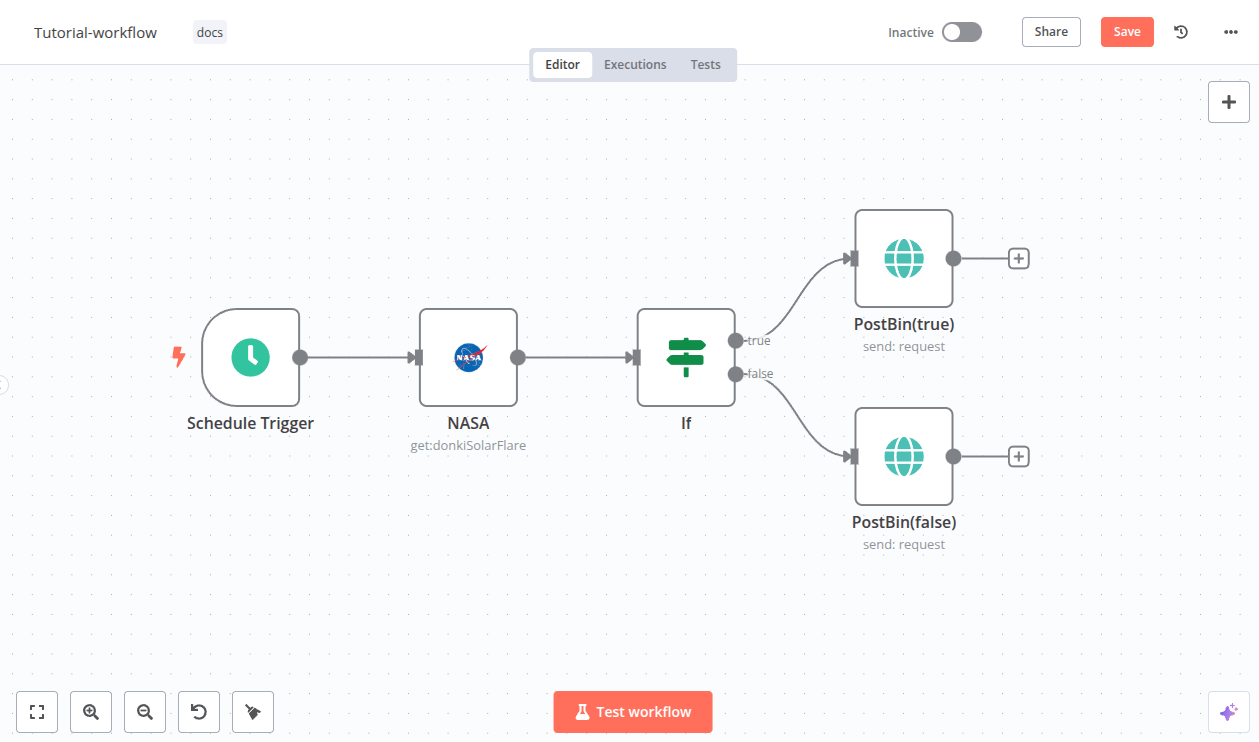
6. n8n

Best for: Technical teams that want self-hosted workflow automation, AI orchestration, and full control over infrastructure and data.

Best workflow automation tools - n8n

Most no-code automation platforms become noticeably more expensive as workflow volume grows.

n8n can be self-hosted, which allows organizations to run large-scale workflows without paying execution-based fees every time an automation runs.

For technical teams managing thousands or even millions of workflow executions, those fees can add up fast.

n8n is also much more developer-oriented than tools like Zapier or Make.

Teams can write custom JavaScript or Python directly inside workflows, connect to virtually any API, orchestrate AI agents, and build highly customized automation systems without relying entirely on pre-built templates.

That's a major reason why n8n has become increasingly popular among AI-focused engineering teams.

The platform integrates particularly well with modern AI infrastructure, including vector databases, LangChain workflows, custom LLM pipelines, and autonomous agent orchestration.

However, unlike simpler no-code platforms, n8n assumes a higher level of technical knowledge. Non-technical teams will usually struggle to build and maintain advanced workflows without engineering support.


Key features

  • Self-hosting allows organizations to keep workflow data entirely inside their own infrastructure.

  • Developers can write custom JavaScript and Python directly inside workflow nodes.

  • AI agent integrations support LangChain orchestration, vector databases, and advanced LLM workflows.

  • HTTP request modules make it possible to connect virtually any API or internal system.

  • Visual workflow builders still provide a clearer interface than purely code-based orchestration tools.


Pros

  • Self-hosting can dramatically reduce costs for high-volume workflow automation.

  • Organizations maintain much greater control over data privacy and compliance.

  • AI orchestration capabilities are much more advanced than many no-code competitors.

  • Custom code support gives technical teams far more flexibility than template-driven platforms.


Cons

  • Non-technical users will face a much steeper learning curve.

  • The native integration ecosystem is smaller than Zapier's or Make's.

  • Self-hosting requires ongoing infrastructure management, updates, and monitoring.


Pricing

  • Self-hosted: Free

  • Starter: $20/month (billed annually)

  • Pro: $50/month (billed annually)

  • Business: $800/month (billed annually)

  • Enterprise: Custom pricing

  • Start-up plan available for companies with under 20 employees at 50% off Business

Best project management automation tools

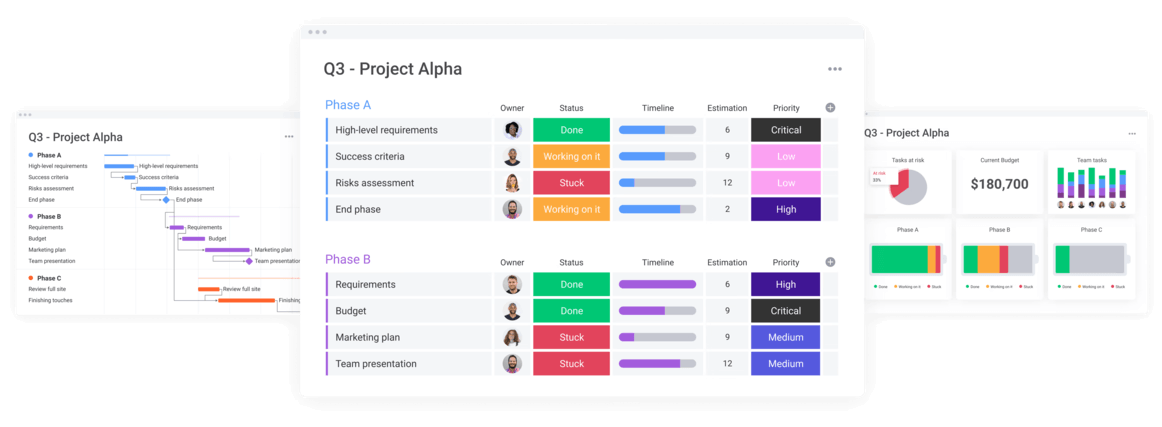
7. Monday

Best for: Teams that want highly visual workflow management and simple operational automations without technical complexity.

Best workflow automation tools - Monday

Most project management tools become difficult to scan once multiple teams start working inside them.

Monday handles that surprisingly well.

The platform is built around highly visual boards, color-coded statuses, dashboards, timelines, and workflow automations that make operational work much easier to understand.

Instead of building complex backend automations, users can create simple workflow rules using natural language logic such as:

  • "When status changes, notify sales"

  • "When a task is completed, create an approval request"

  • "When a due date passes, alert the project owner"

That simplicity makes automation much more approachable for departments that don't have dedicated operations or engineering support.

One of Monday's strengths is how easy it makes it to keep track of work across multiple teams.

Managers can pull information from different projects into a single dashboard, giving them a clearer view of workloads, timelines, and potential bottlenecks.

However, what works well for a growing team doesn't always work as well at a larger scale.

Automation limits on lower-tier plans can become restrictive, and organizations managing highly structured workflows may eventually need more control than Monday's board-based approach offers.


Key features

  • Visual boards support Kanban, Gantt charts, timelines, calendars, maps, and workload tracking.

  • Drag-and-drop automation builders allow teams to automate repetitive project coordination tasks.

  • Multi-board dashboards aggregate metrics and workflow visibility across departments.

  • Built-in collaboration tools keep conversations, updates, and project communication connected to tasks.

  • Templates help teams quickly deploy workflows.


Pros

  • Most non-technical teams can start using the platform very quickly.

  • Visual workflows make operational coordination easier to understand across departments.

  • Dashboard reporting provides strong high-level visibility into projects and workloads.

  • Automations are simple enough for business users to maintain without developers.


Cons

  • Automation limits on lower-tier plans can become restrictive as usage grows.

  • Pricing requires minimum seat purchases even for smaller teams.

  • Workflow structures can become inconsistent without clear internal standards.


Pricing

  • Basic: $12/user/month (billed annually)

  • Standard: $17/user/month (billed annually)

  • Pro: $28/user/month (billed annually)

  • Ultimate: Custom pricing

8. Asana

Best for: Teams that prioritize structured project execution, accountability, and timeline visibility.

Best workflow automation tools - Asana

Asana takes a much more structured approach to workflow management than many competing project platforms.

Everything inside the system is organized around clear hierarchies:

  • projects

  • tasks

  • subtasks

  • dependencies

  • owners

  • timelines

That structure makes it easier to manage projects where work is spread across multiple people and teams. Everyone can see what needs to be done, who is responsible for it, and what needs to happen before the next stage can begin.

Automation is built directly into those workflows. Teams can automatically assign work, update statuses, trigger approvals, notify stakeholders, and move tasks between stages without manually coordinating every transition.

Asana is particularly strong when it comes to accountability. The platform makes it very clear who owns each task, what work depends on it, and how delays affect the rest of the project timeline.

Compared to more open-ended platforms like ClickUp or Monday, however, Asana offers less flexibility for teams that want highly customized workspace structures or non-traditional workflow setups.


Key features

  • Structured task hierarchies help teams manage large projects by making ownership, dependencies, and priorities easier to track.

  • Workflow builders automate approvals, assignments, notifications, and day-to-day operational tasks.

  • Portfolio dashboards bring multiple projects into one place, making it easier to monitor progress across teams.

  • Timeline and Gantt-style views help teams plan schedules, manage dependencies, and spot delays before they affect the broader project.

  • Goals and OKR tracking connect day-to-day work directly to larger business objectives.


Pros

  • Everyone can see who owns a task, what depends on it, and what needs to happen next.

  • Timeline views make it easier to coordinate complex projects involving multiple people and deadlines.

  • Workflow automation is straightforward enough for most non-technical teams to use.

  • Portfolio dashboards give managers a clear view of progress across multiple projects.


Cons

  • Teams that prefer highly customized workspace structures may find Asana more restrictive than platforms like ClickUp.

  • Several advanced capabilities are only available on higher-tier plans.

  • Organizations with less structured workflows may prefer a platform that offers more flexibility in how work is organized.


Pricing

  • Personal: Free

  • Starter: $10.99/user/month (billed annually)

  • Advanced: $24.99/user/month (billed annually)

  • Enterprise: Custom pricing

9. ClickUp

Best for: Teams that want to centralize projects, documents, communication, dashboards, and workflow automation inside one platform.

Best workflow automation tools - ClickUp

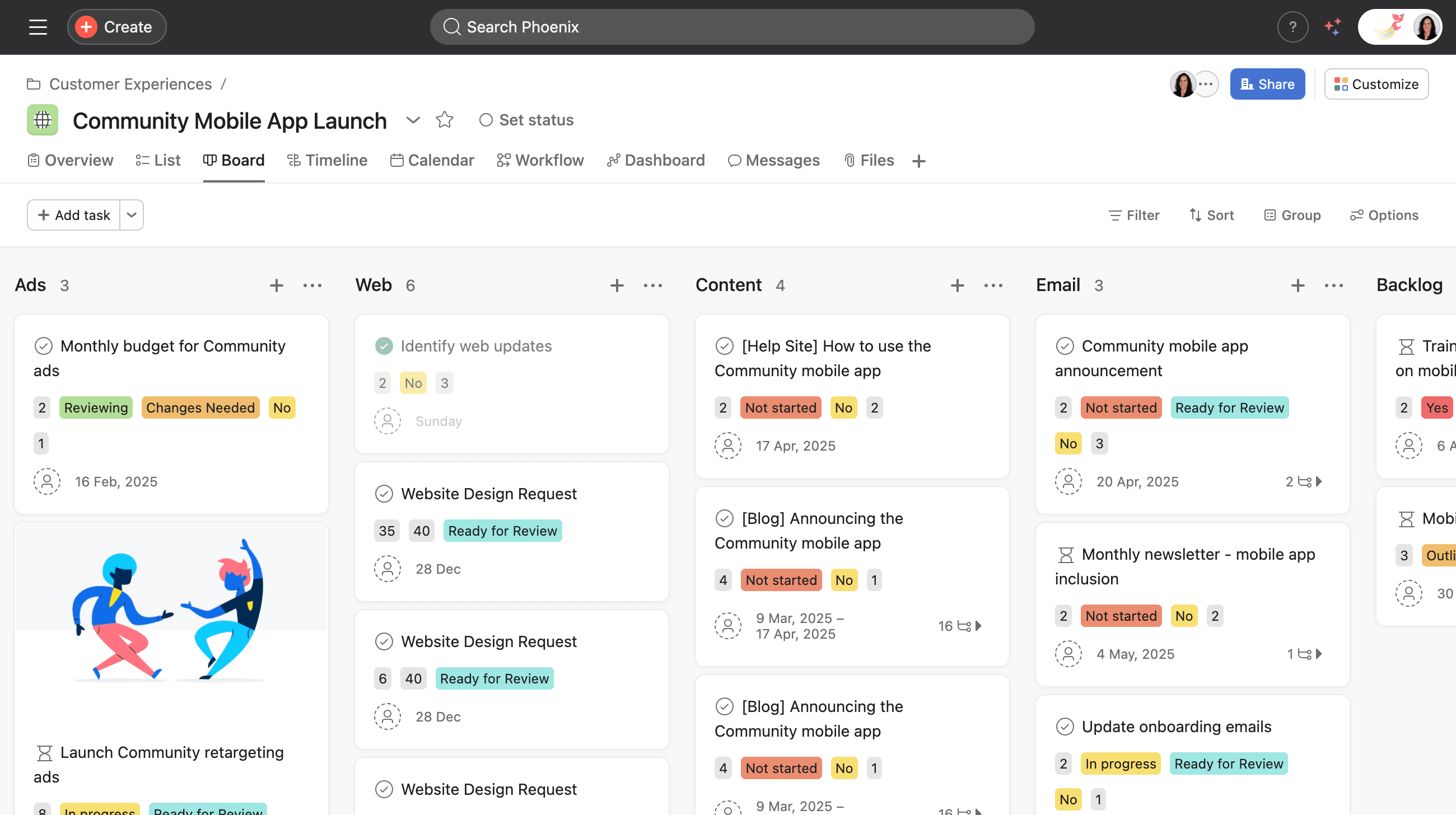
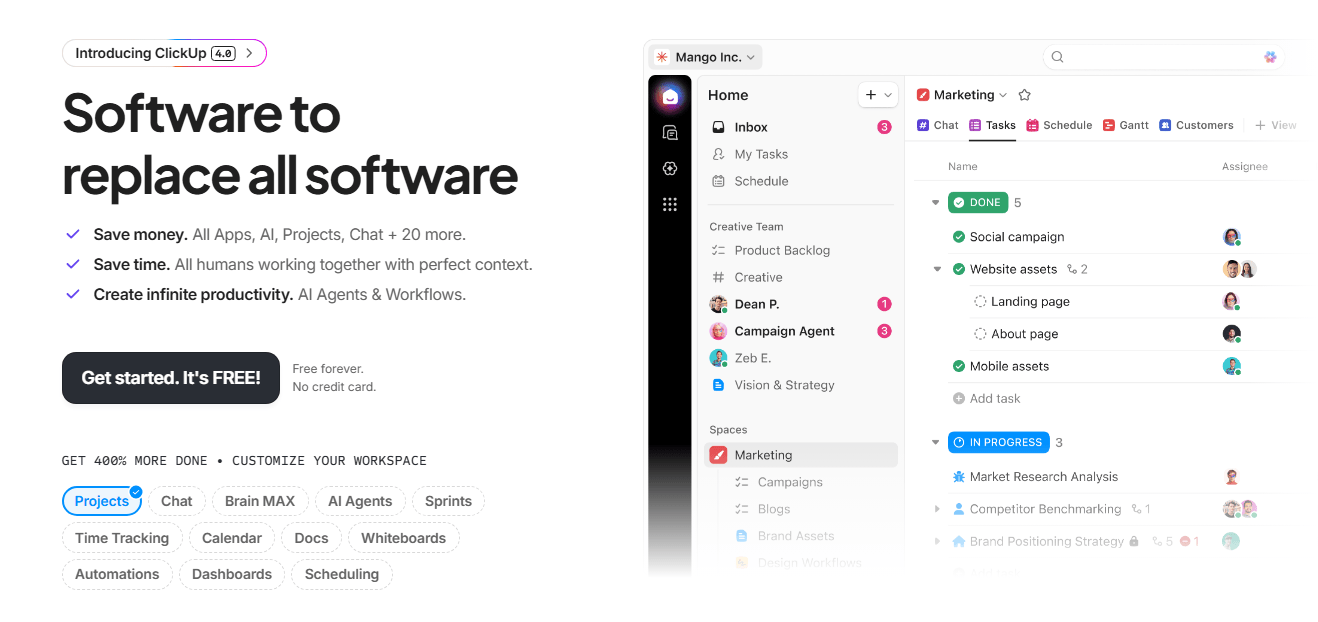
ClickUp brings projects, documents, chats, dashboards, whiteboards, goals, automations, timelines, and reporting into a single platform.

Instead of managing work across multiple tools, teams can keep much of their planning, collaboration, reporting, and workflow management in one place.

That's one reason ClickUp has become particularly popular with startups, agencies, and operations-heavy teams that want to reduce the number of systems employees use every day.

Workflow automation is built into much of the platform.

Tasks can move automatically between stages, work can be assigned to the right people, notifications can be triggered when something changes, and routine processes can continue moving without someone having to manage every step manually.

ClickUp also gives teams a huge amount of flexibility in how they structure work. Spaces, folders, lists, dashboards, and custom views can all be configured differently depending on the department or workflow.

That flexibility is both one of the platform's biggest strengths and one of its biggest challenges.

Without clear internal standards, workspaces can become messy surprisingly quickly.


Key features

  • Built-in docs, chat, dashboards, whiteboards, goals, and task management reduce the need for multiple separate tools.

  • Workflow automations can trigger status updates, assignments, notifications, day-to-day tasks, and approvals automatically.

  • More than 15 view types help teams manage workflows in the format that suits them best.

  • Native time tracking connects operational work directly to reporting and billing workflows.

  • AI capabilities assist with summaries, writing, task generation, and workflow organization.


Pros

  • Teams can centralize a huge amount of operational work inside one platform.

  • Advanced features are available at lower price points than many competing tools.

  • Workflow flexibility allows departments to structure work differently depending on their needs.

  • Automation rules go beyond simple trigger-and-action workflows.


Cons

  • The interface can feel overwhelming for new users because of the platform's feature density.

  • Large workspaces can become difficult to manage without strong internal organization standards.

  • Performance can occasionally slow down in highly customized enterprise environments.


Pricing

  • Free Forever: Basic features

  • Unlimited: $7/user/month (billed annually)

  • Business: $12/user/month (billed annually)

  • Enterprise: Custom pricing

Best enterprise integration and iPaaS platforms

10. MuleSoft

Best for: Large enterprises managing highly complex integrations across cloud systems, APIs, databases, and legacy infrastructure.

Best workflow automation tools - MuleSoft

MuleSoft is designed for organizations that need large numbers of systems to work together reliably.

In many enterprises, information is spread across cloud applications, internal databases, ERP systems, legacy software, and hundreds of APIs.

Keeping all of those systems connected can quickly become difficult, especially when data needs to move between departments, business units, and regions.

MuleSoft helps organizations build those connections in a more structured way.

Instead of creating a new integration every time two systems need to share information, teams can create reusable APIs that can be used across multiple projects and workflows.

That approach can save a significant amount of work over time, particularly in large organizations where the same systems need to be connected repeatedly.

MuleSoft is particularly popular in Salesforce environments and industries with strict governance requirements, including finance, healthcare, and insurance.

It is also built to handle the scale and reliability requirements of large global organizations.

However, MuleSoft is not designed for simple no-code automation projects. Implementations often involve dedicated developers, significant planning, and longer deployment timelines than many of the tools featured in this guide.


Key features

  • Reusable APIs help organizations connect systems once and use those integrations across multiple projects and workflows.

  • Data transformation tools help move and standardize information between databases, applications, and business systems.

  • Hybrid deployment options support cloud applications, company-hosted systems, and legacy software within the same environment.

  • Security and governance controls help organizations manage access, compliance, and audit requirements.

  • Robotic process automation capabilities allow teams to automate tasks involving older desktop applications that don't support modern integrations.


Pros

  • Large organizations can connect systems in a more consistent way instead of building new integrations for every project.

  • Reusable APIs help reduce the amount of integration work required over time.

  • Security, governance, and compliance capabilities are well suited to regulated industries.

  • The platform is designed to handle large volumes of data and transactions.


Cons

  • Costs are significantly higher than most workflow automation tools featured in this guide.

  • Most implementations require experienced developers and integration specialists.

  • Projects often take much longer to deploy than no-code automation platforms.

  • Smaller organizations may find the platform far more powerful than they actually need.


Pricing

Custom enterprise pricing

11. Boomi

Best for: Growing businesses and enterprises that need to connect multiple systems without the complexity of a full-scale integration platform.

Best workflow automation tools - Boomi

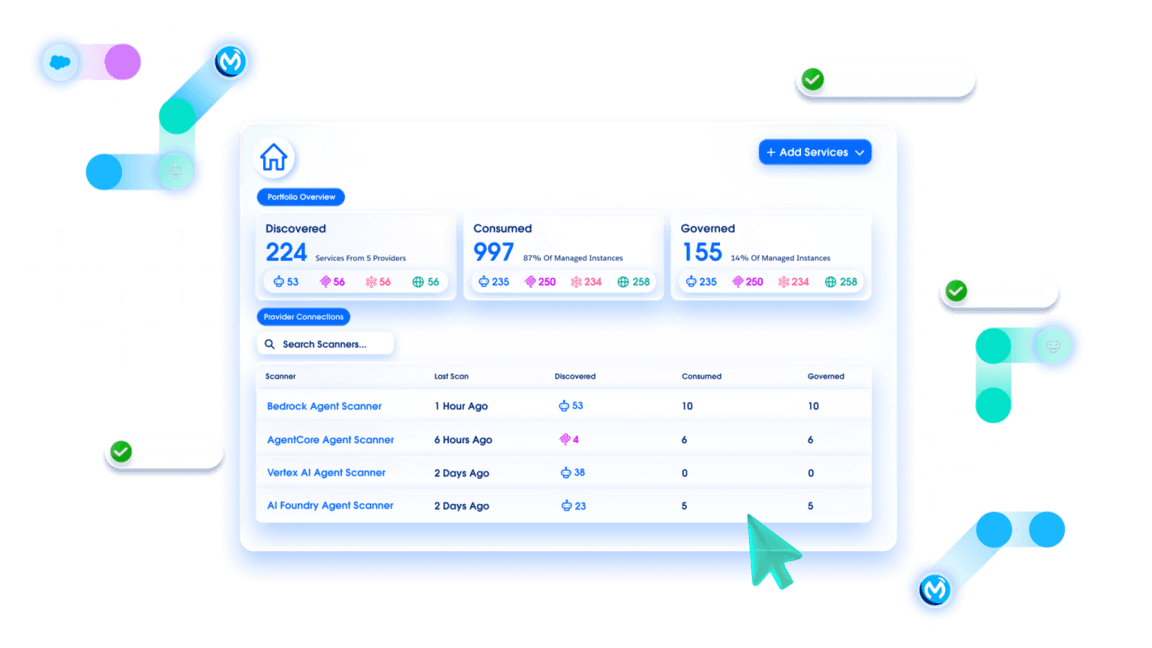
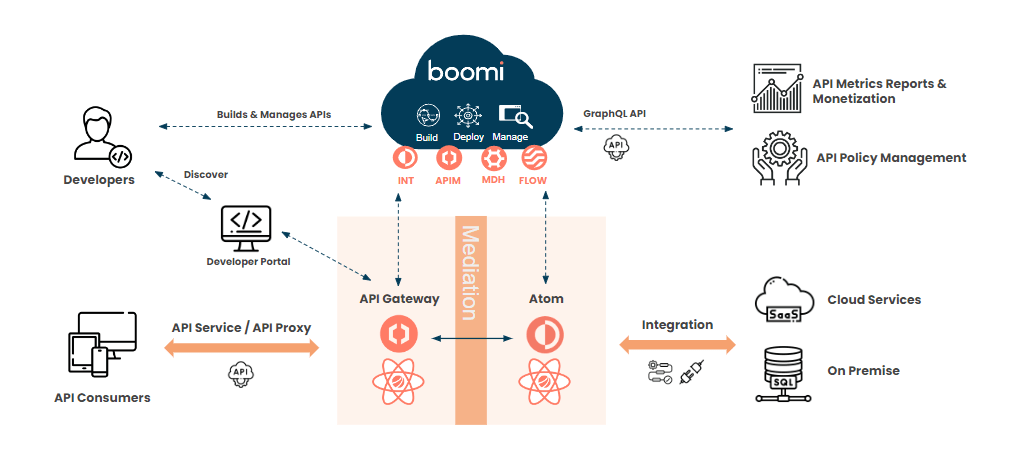
Boomi sits in an interesting middle ground between lightweight no-code automation tools and full-scale enterprise integration infrastructure.

The platform helps organizations connect cloud applications, databases, APIs, and internal systems through a visual interface, making integrations easier to build and maintain than many traditional enterprise platforms.

That balance is one of Boomi's biggest strengths. Teams can build integrations using drag-and-drop workflows while still connecting large numbers of systems across the business.

Boomi is particularly popular with organizations that rely on a mix of newer cloud software and older internal systems. Instead of replacing existing technology, teams can use Boomi to help those systems exchange information.

Many companies choose Boomi because it gives them access to enterprise integration capabilities without requiring the same level of technical expertise, implementation effort, or ongoing maintenance as some larger platforms.

Teams that need complete control over every aspect of their integrations may eventually outgrow that approach, but for many businesses, the balance works well.


Key features

  • Visual integration builders help teams connect cloud applications, databases, APIs, and internal systems without writing large amounts of code.

  • Master Data Hub tools help keep information consistent across systems that don't naturally share data with one another.

  • Cloud and self-managed deployment options allow organizations to connect both modern software and older internal systems.

  • Pre-built connectors reduce the amount of custom integration work required when connecting common business applications.

  • Workflow automation tools help teams automate approvals, notifications, and other operational processes across connected systems.


Pros

  • Teams can build and manage integrations without relying as heavily on developers.

  • Organizations can connect cloud software and older internal systems through the same platform.

  • Pre-built connectors and visual builders help reduce implementation effort.

  • Costs are generally easier to predict than some larger enterprise integration platforms.


Cons

  • Organizations with highly complex requirements may still need experienced integration specialists.

  • Teams that want complete control over every aspect of an integration may find developer-focused platforms more flexible.

  • Some governance and compliance capabilities may require additional configuration depending on how the platform is deployed.


Pricing

Custom pricing

12. Frends

Best for: Microsoft-focused organizations that need secure enterprise integrations with strong compliance and predictable pricing.

Best workflow automation tools - Frends

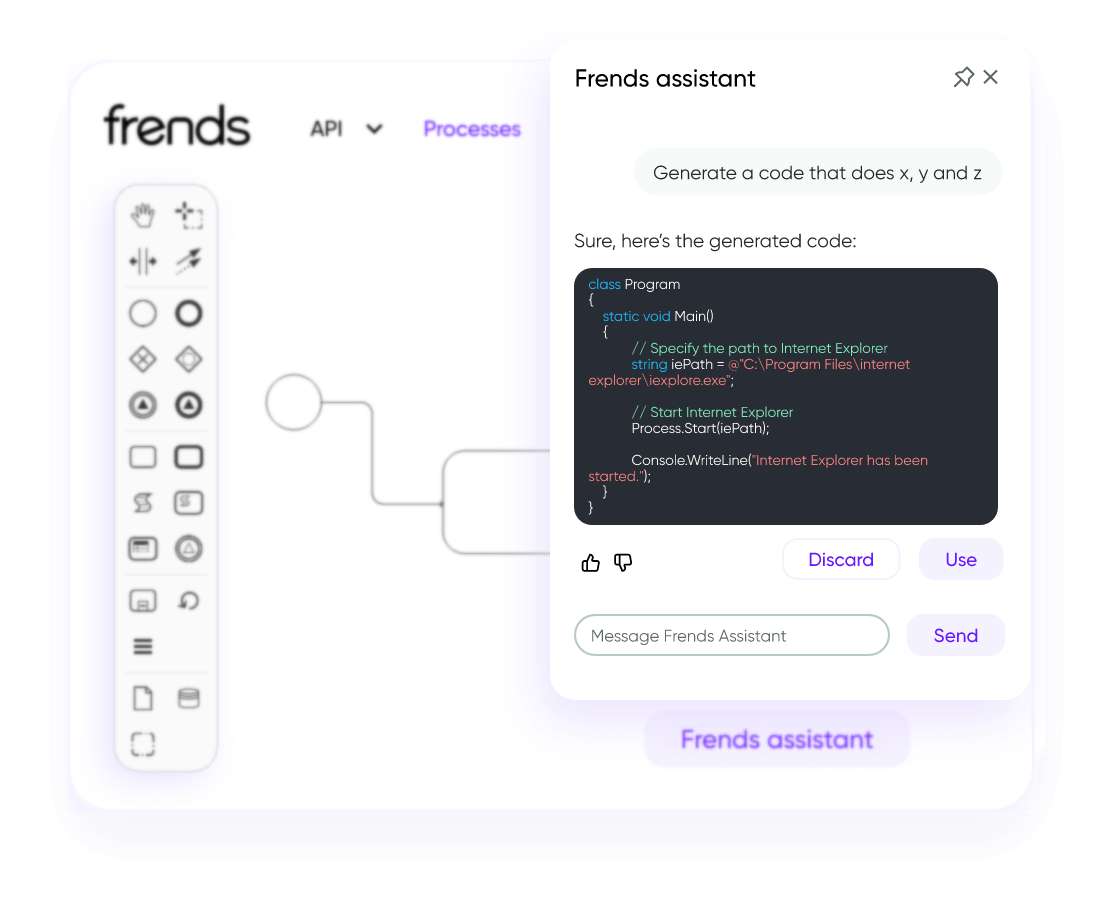
Frends is an enterprise integration platform built for organizations that rely heavily on Microsoft technologies and .NET applications.

The platform combines workflow automation, API management, managed file transfers, and enterprise integrations in a single environment.

Organizations often need more than workflow automation alone. They also need clear control over who can access data, how information moves between systems, and where that data is stored.

For European organizations especially, compliance is a major consideration. Frends puts a strong focus on GDPR controls, regional hosting, auditability, and governance, helping organizations meet both internal policies and regulatory requirements.

The platform also approaches pricing differently from many automation tools.

Instead of charging heavily for every workflow operation, Frends uses more predictable process-based pricing structures, helping organizations avoid sudden cost spikes as automation volume grows.

Compared to broader integration platforms, however, Frends remains more focused on Microsoft environments and enterprise integration projects than general-purpose no-code automation.


Key features

  • Native .NET integration helps organizations connect Microsoft applications, services, and infrastructure more easily.

  • API management, workflow automation, and managed file transfers are all available within the same platform.

  • AI tools help teams generate code, create documentation, and configure workflows more efficiently.

  • Cloud and local deployment options allow organizations to manage integrations across different environments.

  • Governance and audit controls help organizations meet internal policies and regulatory requirements.


Pros

  • GDPR and compliance capabilities are particularly strong for regulated organizations.

  • Pricing is more predictable than many execution-based automation platforms.

  • Teams already working with Microsoft technologies can build on existing skills and infrastructure.

  • Local deployment options provide additional control over how sensitive data is stored and managed.


Cons

  • Organizations outside Microsoft ecosystems may find stronger alternatives.

  • The ecosystem of integrations, partners, and community resources is smaller than some larger competitors.

  • Teams looking for simple no-code automation may find the platform more complex than necessary.


Pricing

Custom pricing

Add-ons available

Best business process automation platforms

13. Microsoft Power Automate

Best for: Organizations already operating heavily inside the Microsoft ecosystem.

Best workflow automation tools - Microsoft Power Automate

If your company already runs on Microsoft 365, there's a good chance Power Automate will feel familiar very quickly.

The platform is deeply connected to:

  • Outlook

  • Teams

  • SharePoint

  • Excel

  • Dynamics 365

  • Power BI

  • and the broader Microsoft ecosystem

That integration is one of its biggest advantages.

Instead of introducing another standalone automation platform, businesses can automate workflows directly inside tools employees already use every day.

Power Automate supports both cloud-based workflows and robotic process automation for desktop applications.

That means organizations can automate modern SaaS processes while still handling older systems that don't offer APIs or modern integrations.

For many businesses, especially enterprise IT departments, that flexibility is extremely valuable.

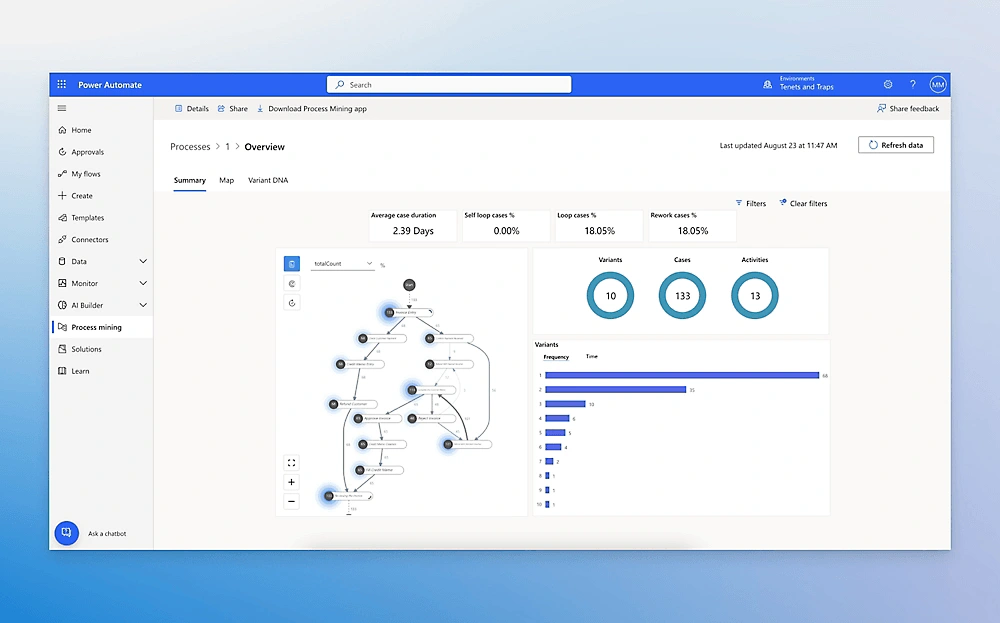
Power Automate can also grow alongside the organization using it. A business user might start with a simple approval workflow, while an IT team can build much more sophisticated automations involving AI, process mining, and desktop automation.

Where things become more complicated is licensing.

Some integrations, AI capabilities, and premium connectors require additional subscriptions, which can make pricing harder to predict once usage expands beyond basic workflows.


Key features

  • Native Microsoft integrations connect workflows directly to Teams, Outlook, SharePoint, Dynamics, and Power BI.

  • Cloud and desktop automation support both API-driven workflows and legacy software automation.

  • Process mining tools help organizations identify bottlenecks and repetitive operational work.

  • AI Builder allows teams to add machine-learning capabilities into workflows without building custom models.

  • Approval workflows automate routing, notifications, and multi-step sign-offs across departments.


Pros

  • Organizations already using Microsoft 365 can automate workflows without introducing entirely new infrastructure.

  • Desktop automation capabilities work well for older systems that lack APIs.

  • The interface is approachable for non-technical business users.

  • Entry-level pricing is relatively accessible compared to larger enterprise BPA platforms.


Cons

  • Premium connectors and AI capabilities can increase costs unexpectedly.

  • As more teams start building automations, keeping workflows organized and consistent can become a challenge.

  • Integrations outside the Microsoft ecosystem often require additional licensing.


Pricing

  • Power Automate Premium: $15/user/month (billed annually)

  • Power Automate Process: $150/month per bot (billed annually)

  • Power Automate Hosted Process: $215/month per bot (billed annually)

  • Add-ons available

14. ServiceNow

Best for: Large enterprises that need greater control and visibility across complex business processes.

Best workflow automation tools - ServiceNow

Most workflow automation platforms focus on connecting applications and automating individual processes.

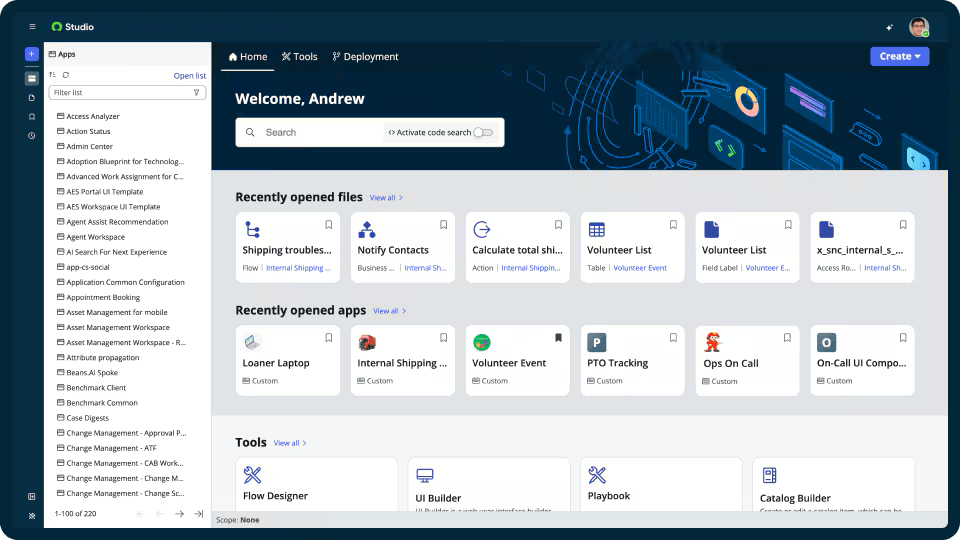
ServiceNow is built for organizations where work passes through multiple departments, systems, and approval stages before it gets completed.

That's particularly important when different teams use different tools, approvals involve several people, and information is spread across dozens of systems.

One of ServiceNow's strengths is helping organizations keep that information connected.

Instead of creating separate copies of the same data in multiple places, teams can work with information that stays synchronized across systems while maintaining control over who can access it.

The platform also includes AI agents, conversational workflows, and automation tools that reduce the amount of manual coordination required to keep work moving.

Requests can be routed automatically, approvals can be assigned to the right people, and issues can be escalated without someone having to manage every step by hand.

However, ServiceNow is not designed for simple no-code automation projects.

Implementations often involve significant planning, customization, governance, and ongoing administration, which is why the platform is most commonly used by large enterprises rather than smaller teams.


Key features

  • Zero-copy integrations help organizations work with information across multiple systems without constantly creating duplicate records.

  • AI agents can route requests, assign work, answer questions, and help automate complex processes.

  • Governance tools provide audit trails, permissions, lineage tracking, and compliance controls.

  • Enterprise orchestration tools connect approvals, workflows, tickets, and business systems across departments.

  • Dashboards help teams monitor workflows, identify delays, and spot bottlenecks before they become larger problems.


Pros

  • Large organizations can manage workflows more consistently across departments and systems.

  • AI agents and automation tools reduce the amount of manual coordination required to keep work moving.

  • Governance, auditability, and compliance capabilities are particularly strong.

  • Dashboards provide a clearer view of how work moves across the organization.


Cons

  • Implementations often involve dedicated consultants, significant planning, and lengthy setup projects.

  • Costs can increase quickly in large enterprise deployments.

  • Highly customized environments may require ongoing maintenance and administrative support.


Pricing

Custom enterprise pricing

15. Nintex

Best for: Organizations managing highly structured approvals, compliance-heavy workflows, and automated document processes.

Best workflow automation tools - Nintex

Some workflows need more than simple task automation.

They need:

  • formal approvals

  • audit trails

  • compliance tracking

  • document generation

  • process mapping

  • and tightly controlled operational rules.

Nintex is built for exactly those kinds of processes.

Many organizations need workflows that follow the same rules every time, create a clear audit trail, and support compliance requirements.

That's especially common in industries where approvals, documentation, and reporting are part of day-to-day operations.

Instead of focusing on lightweight automations between apps, Nintex helps organizations manage larger processes involving multiple stakeholders, approvals, documents, and decision points.

Document generation is a major part of the platform. Teams can automatically create contracts, reports, forms, and other business documents using workflow data instead of manually preparing paperwork at each stage of a process.

Nintex also includes process mapping tools that help teams visualize how work moves through the organization, identify bottlenecks, and standardize procedures across departments.

Organizations looking for simple no-code automations may find Nintex more complex than they need.

The platform is generally a better fit for businesses managing structured processes with strict requirements around approvals, documentation, and compliance.


Key features

  • Visual workflow builders support multi-step approvals, routing logic, and structured business processes.

  • Automated document generation creates contracts, reports, and compliance documents using workflow data.

  • Process mapping tools help organizations visualize workflows and identify opportunities for improvement.

  • Robotic process automation supports repetitive tasks involving legacy desktop systems.

  • Audit trails and governance controls help organizations track activity and meet compliance requirements.


Pros

  • Structured approval workflows work particularly well for regulated industries.

  • Document automation reduces the amount of manual paperwork involved in business processes.

  • Process mapping tools help teams identify bottlenecks and standardize how work gets done.

  • Governance and audit capabilities support compliance-heavy environments.


Cons

  • Entry-level pricing is higher than most workflow automation platforms.

  • Smaller organizations may find the platform unnecessarily complex.

  • Costs can increase as workflow usage grows and additional capabilities are added.


Pricing

Custom enterprise pricing starting at $15,000/year

How to choose the right workflow automation tool

Buying workflow automation software won't help much if nobody understands why work is getting stuck in the first place.

Before comparing features, identify the tasks that consume the most time today. Maybe sales reps spend hours updating CRM records, finance teams manually route approvals, or employees copy the same information between five different systems every day.

Once you know where the friction exists, choosing the right tool becomes much easier.


Our recommendations

  • If you want simple no-code automations between popular apps, Zapier is still one of the easiest platforms to start with.

  • If your workflows involve more advanced branching logic, API connections, or large-scale operational automations, Make offers much more flexibility.

  • If data privacy, self-hosting, and AI orchestration matter most, n8n is one of the strongest options available for technical teams.

  • If your organization already operates heavily inside Microsoft 365, Power Automate usually makes the most sense because of its native integrations and desktop automation capabilities.

  • If your priority is project coordination and operational visibility across teams, Monday, Asana, and ClickUp all offer strong workflow automation inside broader work management platforms.

  • If you're managing highly complex enterprise integrations across cloud systems and legacy infrastructure, MuleSoft, Boomi, Frends, and ServiceNow are built for that level of operational complexity.

  • And if you're looking to automate buyer engagement, proposal personalization, sales follow-ups, and interactive sales workflows, Storydoc offers one of the most complete solutions on the market.

Dominika Krukowska
Hi, I'm Dominika, Content Specialist at Storydoc. As a creative professional with experience in fashion, I'm here to show you how to amplify your brand message through the power of storytelling and eye-catching visuals.

Engaging decks. Made easy

Create your best presentation to date.

Stop losing opportunities to ineffective presentations.
Your new amazing deck is one click away!